Templates · Settings screens · Social app · Tether
Tether Settings screen
A settings screen from Tether, a family location and safety app template in a Minimal style. Screen 25 of 25.
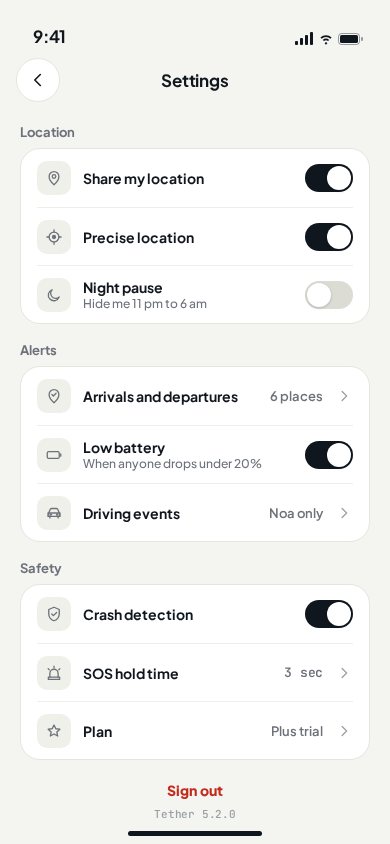
Tether is a complete family location and safety app: welcome, location access, sign in and joining a circle, a live circle map with everyone's place and battery, a member page, a day of location history, places with arrival and departure alerts, adding a place, weekly driving reports and a single drive, live walk home tracking, check in, an SOS with its confirmation, crash detection, emergency contacts, alerts, circle members, invites, a Plus plan with checkout, profile and settings. Paper and white with ink, hi-vis lime and a signal red.
| Detail | Value |
|---|---|
| Screen type | Settings |
| App | Tether: Family location and safety |
| Category | Social |
| Design language | Minimal, light |
| Type | Plus Jakarta Sans |
| Colours | #f4f4f0 background, #ffffff surface, #10161d text, #6d727a text-muted, #cbf24a accent, #10161d accent-contrast, #4f6b00 secondary, #e6e6df border, #ef4130 danger |
What this screen says
- Settings
- Location
- Share my location
- Precise location
- Night pauseHide me 11 pm to 6 am
- Alerts
- Arrivals and departures
- 6 places
- Low batteryWhen anyone drops under 20%
- Driving events
- Noa only
- Safety
- Crash detection
- SOS hold time
- 3 sec
- Plan
- Plus trial
- Sign outTether 5.2.0
Around it in Tether
More settings screens
- Agora Settings: Communities, threads and votes
- Spark Settings: Swipe dating
- Candid Settings: One real photo a day
- Blink Settings: Camera chat and stories
- Cipher Privacy: Encrypted private messenger
- Commons Settings: Friends, groups and events
- Facet Settings: Video calls with family and friends
- Stoop Settings: Neighbourhood noticeboard
- Aura Settings: Moods with close friends
- Kindly Settings: Volunteering near you
- Cohort Settings: Alumni and mentor network
- Kin Settings: Private family circle
Every social app settings screen
What makes a good settings screen
- Group options into clear sections. Account, notifications, privacy, appearance and help, with headings, so people scan to the right group.
- Label settings by their effect. "Daily reminder at 8:00" is clearer than "Reminders". Add a short description under options that need one.
- Use the right control. Toggles for on and off, a row that opens a list for choices, and sliders only for ranges.
- Apply changes immediately. Most mobile settings take effect when changed, with no Save button to forget.
The full settings screen guide and every example
Remix Tether free: describe your own app and it is drawn in this design. Or get its files from $10: Figma, React Native, SwiftUI, Flutter and HTML.