Templates · Detail screens · Travel app · Fare
Fare Flight screen
A detail screen from Fare, a flight search and price alerts app template in a Minimal style. Screen 9 of 25.
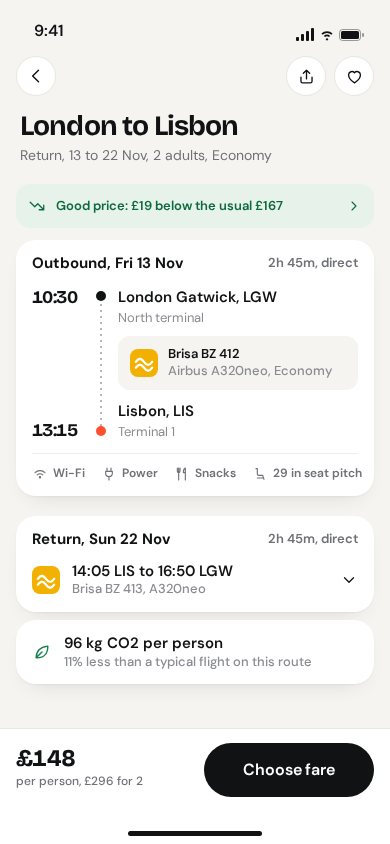
Fare is a complete flight search app: welcome, home airport, sign in, a search home with a dotted route arc, airport search, a fare calendar, results, filters, a flight itinerary, fare options, passengers, seat map, review and pay, booked, trips, a boarding pass, live flight status, price history with a forecast, price alerts and a new alert, explore by price, notifications, a premium plan, profile and settings. Warm paper and white with ink black and a single flare orange.
| Detail | Value |
|---|---|
| Screen type | Detail |
| App | Fare: Flight search and price alerts |
| Category | Travel |
| Design language | Minimal, light |
| Type | Bricolage Grotesque for headings, DM Sans for text |
| Colours | #f5f4f0 background, #ffffff surface, #111214 text, #6f7177 text-muted, #ff4f2e accent, #ffffff accent-contrast, #111214 secondary, #e8e6df border, #12804a success |
What this screen says
- London to Lisbon
- Return, 13 to 22 Nov, 2 adults, Economy
- Good price: £19 below the usual £167
- Outbound, Fri 13 Nov2h 45m, direct
- London Gatwick, LGW
- North terminal
- Brisa BZ 412Airbus A320neo, Economy
- Lisbon, LIS
- Terminal 1
- Wi-Fi Power Snacks 29 in seat pitch
- Return, Sun 22 Nov2h 45m, direct
- 14:05 LIS to 16:50 LGWBrisa BZ 413, A320neo
- 96 kg CO2 per person11% less than a typical flight on this route
- £148per person, £296 for 2
- Choose fare
Around it in Fare
More detail screens
- Hollow Stay: Cabin and boutique stays
- Aloft Flight: Flight tracker
- Pitch Campsite: Campsite booking and trip kit
- Hail Safety: Ride hailing
- Volta Station: EV charging
- Museo Exhibition: Museum guide
- Roamly Destination: Trips, stays and experiences
- Jaunt Destination: Bus, train and flight booking
- Spoke Station: Bike sharing
- Navara Yacht: Yacht charter
- Voya Trip: Travel booking
- Wheelhouse Trip request: Driver app for ride hailing
Every travel app detail screen
What makes a good detail screen
- Lead with what identifies the item. A large image or title, the price or status, and the key facts at the top. People should know they are in the right place at a glance.
- Keep the main action visible. A sticky bottom button for Add to cart, Book or Play stays reachable while people scroll through details.
- Order information by importance. The facts that decide the choice come first; reviews, specifications and fine print further down.
- Use progressive disclosure. Long descriptions, specifications and policies can expand on tap rather than filling the screen.
The full detail screen guide and every example
Remix Fare free: describe your own app and it is drawn in this design. Or get its files from $10: Figma, React Native, SwiftUI, Flutter and HTML.