Templates · Detail screens · Travel app · Omnia
Omnia Restaurant screen
A detail screen from Omnia, a travel app template in a Playful style. Screen 9 of 25.
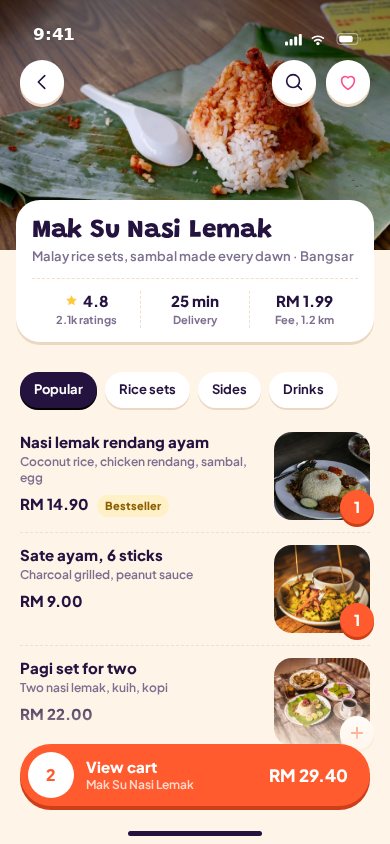
Omnia is a complete everyday super app set in Kuala Lumpur: welcome, phone sign in with an SMS code, a home with the wallet, Orbs and a grid of service tiles, where to, choosing a car or bike on a route map, a live driver arriving screen and a trip rating with tips, food browse, a restaurant, dish options, cart, live order tracking and delivered, a grocery mart, sending a parcel, the wallet with spending by service, scan to pay at a stall, pay a merchant and a receipt, rewards, vouchers, activity, a Plus membership, profile and settings. Apricot cream with persimmon, grape and sunflower.
| Detail | Value |
|---|---|
| Screen type | Detail |
| App | Omnia: Super app for rides, food and payments |
| Category | Travel |
| Design language | Playful, light |
| Type | Grandstander for headings, Plus Jakarta Sans for text |
| Colours | #fff4e8 background, #ffffff surface, #24123f text, #7d6f8f text-muted, #ff5b2e accent, #ffffff accent-contrast, #6c4cf5 secondary, #f0dfcc border, #e5304f danger |
What this screen says
- Mak Su Nasi Lemak
- Malay rice sets, sambal made every dawn · Bangsar
- 4.82.1k ratings
- 25 minDelivery
- RM 1.99Fee, 1.2 km
- Popular Rice sets Sides Drinks
- Nasi lemak rendang ayam
- Coconut rice, chicken rendang, sambal, egg
- RM 14.90Bestseller
- Sate ayam, 6 sticks
- Charcoal grilled, peanut sauce
- RM 9.00
- Pagi set for two
- Two nasi lemak, kuih, kopi
- RM 22.00
- 2View cartMak Su Nasi Lemak RM 29.40
Around it in Omnia
More detail screens
- Spoke Station: Bike sharing
- Navara Yacht: Yacht charter
- Voya Trip: Travel booking
- Wheelhouse Trip request: Driver app for ride hailing
- Fuelup Station: Pay at the pump and car wash
- Staya Listing: Homes and stays from local hosts
- Lodge Hotel: Hotels, deals and reservations
- Fare Flight: Flight search and price alerts
- Rove Attraction: Reviews and things to do
- Ignition Car: Car rental from local hosts
- Contrail Fares: Airline booking, check-in and boarding
- Keycard Hotel: Hotel stays, digital key and room service
Every travel app detail screen
What makes a good detail screen
- Lead with what identifies the item. A large image or title, the price or status, and the key facts at the top. People should know they are in the right place at a glance.
- Keep the main action visible. A sticky bottom button for Add to cart, Book or Play stays reachable while people scroll through details.
- Order information by importance. The facts that decide the choice come first; reviews, specifications and fine print further down.
- Use progressive disclosure. Long descriptions, specifications and policies can expand on tap rather than filling the screen.
The full detail screen guide and every example
Remix Omnia free: describe your own app and it is drawn in this design. Or get its files from $10: Figma, React Native, SwiftUI, Flutter and HTML.