Templates · Detail screens · Travel app · Rove
Rove Attraction screen
A detail screen from Rove, a reviews and things to do app template in a Playful style. Screen 8 of 25.
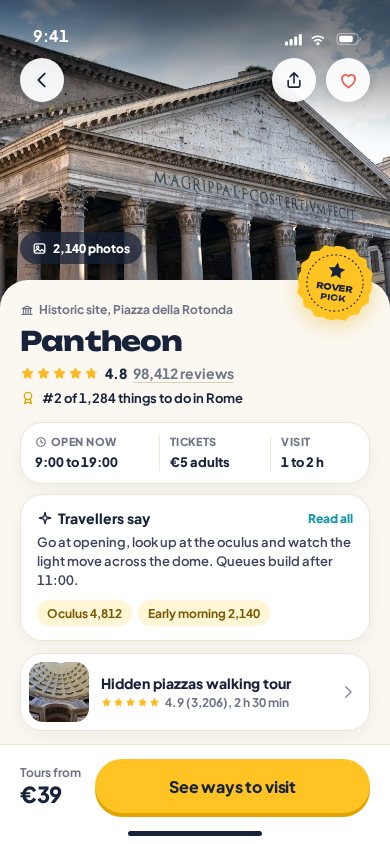
Rove is a complete travel reviews app: welcome, travel style, sign in, a home with search and a trip card, search, things to do with filters, a map with rating pins, an attraction page, traveller photos, review scores and a full review, writing a review, restaurants and a restaurant page, a small group tour, date and time picking, checkout and a booked ticket, trips and a day by day itinerary, contribution stats, notifications, a Plus plan, profile and settings. Paper and white with deep ink navy, marigold stars and lagoon teal.
| Detail | Value |
|---|---|
| Screen type | Detail |
| App | Rove: Reviews and things to do |
| Category | Travel |
| Design language | Playful, light |
| Type | Unbounded for headings, Plus Jakarta Sans for text |
| Colours | #fbf8f1 background, #ffffff surface, #18223a text, #6f7487 text-muted, #ffc423 accent, #18223a accent-contrast, #1597a8 secondary, #ece5d6 border, #f0604f danger |
What this screen says
- 2,140 photos
- Historic site, Piazza della Rotonda
- Pantheon
- 4.8 98,412 reviews
- #2 of 1,284 things to do in Rome
- Open now9:00 to 19:00
- Tickets€5 adults
- Visit1 to 2 h
- Travellers say Read all
- Go at opening, look up at the oculus and watch the light move across the dome. Queues build after 11:00.
- Oculus 4,812 Early morning 2,140
- Hidden piazzas walking tour
- 4.9 (3,206), 2 h 30 min
- Tours from€39
- See ways to visit
Around it in Rove
More detail screens
- Fare Flight: Flight search and price alerts
- Ignition Car: Car rental from local hosts
- Contrail Fares: Airline booking, check-in and boarding
- Keycard Hotel: Hotel stays, digital key and room service
- Detour Station: Community driving navigation
- Convoy Ride: Carpooling between cities
- Manifest Itinerary: Trip plans from your confirmation emails
- Roadster Controls: Your electric car, from your phone
- Fairground Ride: Theme park tickets, wait times and map
- Scooter: E-scooter and e-bike rental
- Nomad Country: Travel eSIM data plans
- Tern Sailing: Ferry and island hopping
Every travel app detail screen
What makes a good detail screen
- Lead with what identifies the item. A large image or title, the price or status, and the key facts at the top. People should know they are in the right place at a glance.
- Keep the main action visible. A sticky bottom button for Add to cart, Book or Play stays reachable while people scroll through details.
- Order information by importance. The facts that decide the choice come first; reviews, specifications and fine print further down.
- Use progressive disclosure. Long descriptions, specifications and policies can expand on tap rather than filling the screen.
The full detail screen guide and every example
Remix Rove free: describe your own app and it is drawn in this design. Or get its files from $10: Figma, React Native, SwiftUI, Flutter and HTML.