Templates · Booking and checkout screens · Education app · Almanac
Almanac Donate screen
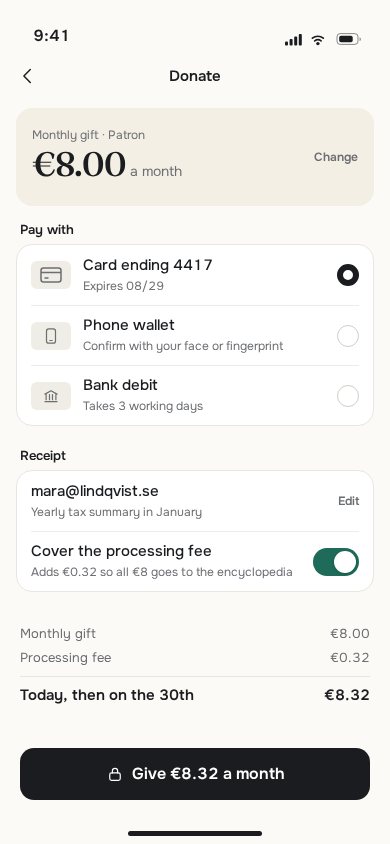
A checkout screen from Almanac, an education app template in a Minimal style. Screen 21 of 25.
Almanac is a complete encyclopedia reader: welcome, sign in, an explore feed with the featured article, trending reads, on this day and the picture of the day, a full article with contents, quick facts and link previews, search with suggestions and results, saved reading lists, a map of articles nearby, page history, talk threads, section editing, the same article in 74 languages, reading stats, and a supporter plan with a donation, receipt, notifications, profile and settings. Paper white and ink, with viridian links and one vermilion accent.
| Detail | Value |
|---|---|
| Screen type | Checkout |
| App | Almanac: The free encyclopedia reader |
| Category | Education |
| Design language | Minimal, light |
| Type | Fraunces for headings, Onest for text |
| Colours | #fbfaf6 background, #ffffff surface, #1a1c1f text, #6c6e72 text-muted, #1d6b58 accent, #e3efe9 accent-tint, #c8502f secondary, #f3efe5 parchment, #e8e6df border |
What this screen says
- Donate
- Monthly gift · Patron €8.00 a month
- Change
- Pay with
- Card ending 4417Expires 08/29
- Phone walletConfirm with your face or fingerprint
- Bank debitTakes 3 working days
- Receipt
- mara@lindqvist.seYearly tax summary in January
- Edit
- Cover the processing feeAdds €0.32 so all €8 goes to the encyclopedia
- Monthly gift €8.00
- Processing fee €0.32
- Today, then on the 30th €8.32
- Give €8.32 a month
Around it in Almanac
More booking and checkout screens
- Homeroom Hand in: School, all on one page
- Chalk Checkout: Design courses
- Encore Checkout: Creator courses
- Tutor Availability: Book online tutors for any skill
- Leaf Buy: E-books and reading
- Tiles Checkout: Daily word and number puzzles
- Stacks Borrow: Borrow e-books and audiobooks from your library
- Penpal Checkout: Language exchange chat
- Lexis Gift Lexis: A word a day
- Quanta Book session: Interactive physics lessons
- Cram Checkout: Exam prep and mock tests
- Quad Enrollment: University campus app
Every education app checkout screen
What makes a good checkout screen
- Show the total early and honestly. Taxes, delivery and service fees should appear before the last step. A higher total on the final screen feels like a trick.
- Offer wallet payments. Apple Pay and Google Pay skip card typing entirely. Show them first when they are available.
- Ask for the minimum. Only the fields needed to deliver or book. Save details for next time.
- Let people review before paying. A clear summary of items, dates, address and price, with each part editable without starting over.
The full checkout screen guide and every example
Remix Almanac free: describe your own app and it is drawn in this design. Or get its files from $10: Figma, React Native, SwiftUI, Flutter and HTML.