Templates · Booking and checkout screens · Education app · Quanta
Quanta Book session screen
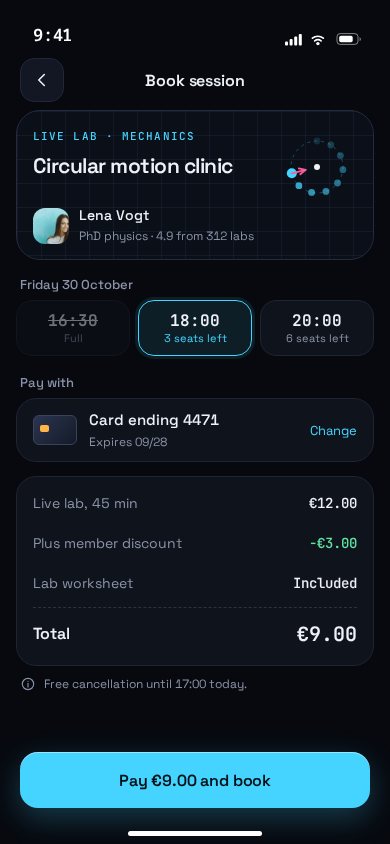
A checkout screen from Quanta, an interactive physics lessons app template in a Dark-first style. Screen 20 of 25.
Quanta is a complete physics learning app: welcome, a goal picker and sign in, a home with the lesson in progress, explore by topic, a course map, a lesson page, an interactive projectile simulation with sliders, an animated explainer, a quiz with feedback and a lesson complete screen, a live pendulum lab, a lab notebook and a results form, a formula sheet and formula page, progress stats, live tutor labs with booking and confirmation, a Plus plan, notifications, profile and settings. Ink black and graph paper with photon cyan, amber energy and magenta force.
| Detail | Value |
|---|---|
| Screen type | Checkout |
| App | Quanta: Interactive physics lessons |
| Category | Education |
| Design language | Dark-first, dark |
| Type | Instrument Serif for headings, Space Grotesk for text |
| Colours | #07090f background, #0f131c surface, #eef1f8 text, #8a93a8 text-muted, #45d4ff accent, #03121a accent-contrast, #ffb547 secondary, #1e2433 border, #ff5c9a danger |
What this screen says
- Book session
- Live lab · Mechanics
- Circular motion clinic
- Lena VogtPhD physics · 4.9 from 312 labs
- Friday 30 October
- 16:30Full
- 18:003 seats left
- 20:006 seats left
- Pay with
- Card ending 4471Expires 09/28
- Change
- Live lab, 45 min €12.00
- Plus member discount −€3.00
- Lab worksheet Included
- Total €9.00
- Free cancellation until 17:00 today.
- Pay €9.00 and book
Around it in Quanta
More booking and checkout screens
- Tutor Availability: Book online tutors for any skill
- Leaf Buy: E-books and reading
- Almanac Donate: The free encyclopedia reader
- Tiles Checkout: Daily word and number puzzles
- Stacks Borrow: Borrow e-books and audiobooks from your library
- Penpal Checkout: Language exchange chat
- Lexis Gift Lexis: A word a day
- Cram Checkout: Exam prep and mock tests
- Quad Enrollment: University campus app
- Palm Book a class: Learn sign language
- Epoch Confirm plan: History on a timeline
- Wren Checkout: Early reading for kids
Every education app checkout screen
What makes a good checkout screen
- Show the total early and honestly. Taxes, delivery and service fees should appear before the last step. A higher total on the final screen feels like a trick.
- Offer wallet payments. Apple Pay and Google Pay skip card typing entirely. Show them first when they are available.
- Ask for the minimum. Only the fields needed to deliver or book. Save details for next time.
- Let people review before paying. A clear summary of items, dates, address and price, with each part editable without starting over.
The full checkout screen guide and every example
Remix Quanta free: describe your own app and it is drawn in this design. Or get its files from $10: Figma, React Native, SwiftUI, Flutter and HTML.