Templates · Booking and checkout screens · Education app · Quad
Quad Enrollment screen
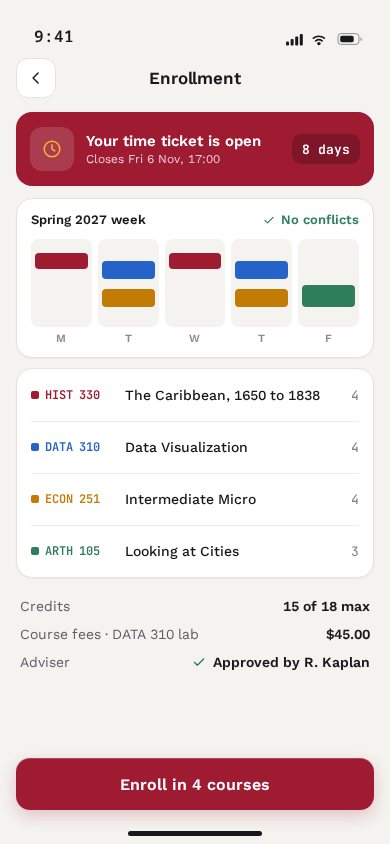
A checkout screen from Quad, a university campus app template in an Enterprise style. Screen 14 of 25.
Quad is a complete campus app for a student at Calder University: welcome, sign in with a Calder ID and a code check, a Today home with the next class, a week timetable, class and course pages, a recorded lecture with chapters, assignments, a file submission with a receipt, grades with a GPA trend, next term's course search, enrollment and confirmation, a campus map, the library with live busyness, study room booking, a live shuttle, dining, meal plans, a digital campus ID, notifications, profile and settings. Stone and white with collegiate crimson, gold and four course colours.
| Detail | Value |
|---|---|
| Screen type | Checkout |
| App | Quad: University campus app |
| Category | Education |
| Design language | Enterprise, light |
| Type | Instrument Serif for headings, Work Sans for text |
| Colours | #f4f3ef background, #ffffff surface, #17181c text, #7a7c84 text-muted, #9e1b32 accent, #ffffff accent-contrast, #f2b731 secondary, #e6e3dc border, #d2382f danger |
What this screen says
- Enrollment
- Your time ticket is openCloses Fri 6 Nov, 17:00
- 8 days
- Spring 2027 week No conflicts
- HIST 330 The Caribbean, 1650 to 18384
- DATA 310 Data Visualization4
- ECON 251 Intermediate Micro4
- ARTH 105 Looking at Cities3
- Credits 15 of 18 max
- Course fees · DATA 310 lab $45.00
- Adviser Approved by R. Kaplan
- Enroll in 4 courses
Around it in Quad
More booking and checkout screens
- Almanac Donate: The free encyclopedia reader
- Tiles Checkout: Daily word and number puzzles
- Stacks Borrow: Borrow e-books and audiobooks from your library
- Penpal Checkout: Language exchange chat
- Lexis Gift Lexis: A word a day
- Quanta Book session: Interactive physics lessons
- Cram Checkout: Exam prep and mock tests
- Palm Book a class: Learn sign language
- Epoch Confirm plan: History on a timeline
- Wren Checkout: Early reading for kids
- Proof Book session: Maths tutor that shows its working
- Skim Confirm plan: Speed reading trainer
Every education app checkout screen
What makes a good checkout screen
- Show the total early and honestly. Taxes, delivery and service fees should appear before the last step. A higher total on the final screen feels like a trick.
- Offer wallet payments. Apple Pay and Google Pay skip card typing entirely. Show them first when they are available.
- Ask for the minimum. Only the fields needed to deliver or book. Save details for next time.
- Let people review before paying. A clear summary of items, dates, address and price, with each part editable without starting over.
The full checkout screen guide and every example
Remix Quad free: describe your own app and it is drawn in this design. Or get its files from $10: Figma, React Native, SwiftUI, Flutter and HTML.