Templates · Booking and checkout screens · Education app · Leaf
Leaf Buy screen
A checkout screen from Leaf, an e-books and reading app template in a Minimal style. Screen 18 of 25.
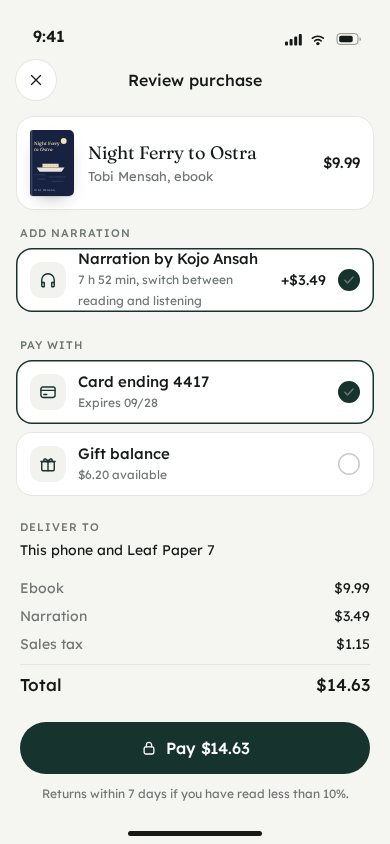
Leaf is a complete e-book and reading app: welcome, taste picker and sign in, a home that picks up where you left off, a library of covers with progress, a serif reader with its menu, display sheet, contents, highlights, dictionary, notebook and notes, narration with a synced page, the store, search, a book page with checkout and a purchased screen, an author page, reading stats, a membership plan, notifications, profile and settings. Paper white and pine green with an apricot ribbon.
| Detail | Value |
|---|---|
| Screen type | Checkout |
| App | Leaf: E-books and reading |
| Category | Education |
| Design language | Minimal, light |
| Type | Fraunces for headings, Lexend for text |
| Colours | #f5f5f1 background, #ffffff surface, #151a19 text, #6f7674 text-muted, #ef7d57 accent, #151a19 accent-contrast, #17332e secondary, #e5e6e1 border, #d6452f danger |
What this screen says
- Review purchase
- Night Ferry to Ostra
- Tobi Mensah, ebook
- Add narration
- Narration by Kojo Ansah
- 7 h 52 min, switch between reading and listening
- Pay with
- Card ending 4417
- Expires 09/28
- Gift balance
- $6.20 available
- Deliver to
- This phone and Leaf Paper 7
- Ebook $9.99
- Narration $3.49
- Sales tax $1.15
- Total $14.63
- Pay $14.63
- Returns within 7 days if you have read less than 10%.
Around it in Leaf
More booking and checkout screens
- Palm Book a class: Learn sign language
- Epoch Confirm plan: History on a timeline
- Wren Checkout: Early reading for kids
- Proof Book session: Maths tutor that shows its working
- Skim Confirm plan: Speed reading trainer
- Terra Checkout: Geography and flags quiz
- Homeroom Hand in: School, all on one page
- Chalk Checkout: Design courses
- Encore Checkout: Creator courses
- Tutor Availability: Book online tutors for any skill
- Almanac Donate: The free encyclopedia reader
- Tiles Checkout: Daily word and number puzzles
Every education app checkout screen
What makes a good checkout screen
- Show the total early and honestly. Taxes, delivery and service fees should appear before the last step. A higher total on the final screen feels like a trick.
- Offer wallet payments. Apple Pay and Google Pay skip card typing entirely. Show them first when they are available.
- Ask for the minimum. Only the fields needed to deliver or book. Save details for next time.
- Let people review before paying. A clear summary of items, dates, address and price, with each part editable without starting over.
The full checkout screen guide and every example
Remix Leaf free: describe your own app and it is drawn in this design. Or get its files from $10: Figma, React Native, SwiftUI, Flutter and HTML.