Templates · Booking and checkout screens · Education app · Encore
Encore Checkout screen
A checkout screen from Encore, a creator courses app template in a Dark-first style. Screen 16 of 25.
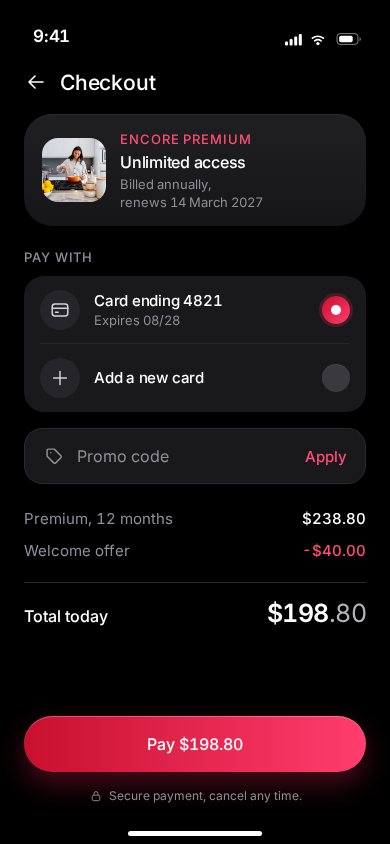
Encore is a complete creator course marketplace: welcome, sign in, a verification code, interests, a feed with a featured course and continue watching, explore, search, categories, a course page with chapters, the lesson player, reviews, creators and creator profiles, subscription plans, checkout, a confirmation, my courses, downloads, a saved list, learning progress, a certificate, purchases, account and settings. Pure black with a single crimson to pink gradient and plenty of photography.
| Detail | Value |
|---|---|
| Screen type | Checkout |
| App | Encore: Creator courses |
| Category | Education |
| Design language | Dark-first, dark |
| Type | Inter |
| Colours | #000000 background, #1a1a1c surface, #ffffff text, #8f8f97 text-muted, #ee2752 accent, #ffffff accent-contrast, #3a3a3e secondary, #2a2a2e border, #ff5a4d danger |
What this screen says
- Checkout
- Encore premium
- Unlimited access
- Billed annually,
- renews 14 March 2027
- Pay with
- Card ending 4821
- Expires 08/28
- Add a new card
- Promo code Apply
- Premium, 12 months $238.80
- Welcome offer -$40.00
- Total today
- Pay $198.80
- Secure payment, cancel any time.
Around it in Encore
More booking and checkout screens
- Tutor Availability: Book online tutors for any skill
- Leaf Buy: E-books and reading
- Almanac Donate: The free encyclopedia reader
- Tiles Checkout: Daily word and number puzzles
- Stacks Borrow: Borrow e-books and audiobooks from your library
- Penpal Checkout: Language exchange chat
- Lexis Gift Lexis: A word a day
- Quanta Book session: Interactive physics lessons
- Cram Checkout: Exam prep and mock tests
- Quad Enrollment: University campus app
- Palm Book a class: Learn sign language
- Epoch Confirm plan: History on a timeline
Every education app checkout screen
What makes a good checkout screen
- Show the total early and honestly. Taxes, delivery and service fees should appear before the last step. A higher total on the final screen feels like a trick.
- Offer wallet payments. Apple Pay and Google Pay skip card typing entirely. Show them first when they are available.
- Ask for the minimum. Only the fields needed to deliver or book. Save details for next time.
- Let people review before paying. A clear summary of items, dates, address and price, with each part editable without starting over.
The full checkout screen guide and every example
Remix Encore free: describe your own app and it is drawn in this design. Or get its files from $10: Figma, React Native, SwiftUI, Flutter and HTML.