Templates · Onboarding screens · Food app · Aisle
Aisle Household screen
An onboarding screen from Aisle, a shared grocery lists app template in a Minimal style. Screen 2 of 25.
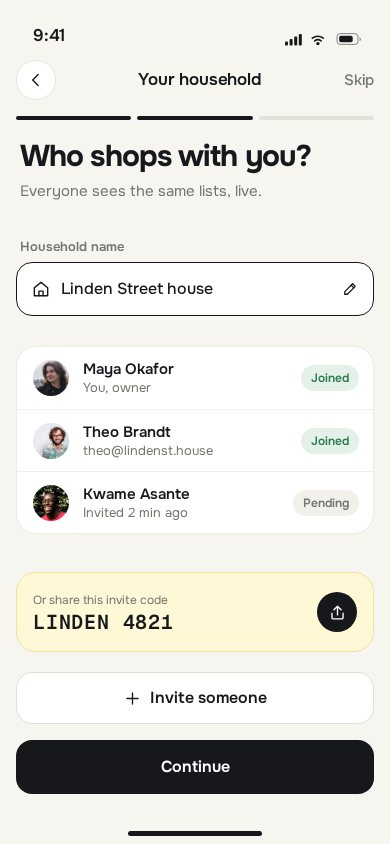
Aisle is a complete shared grocery app for a household: welcome, household setup, sign in, all lists, a list sorted by aisle with who added what, quick add with item tiles, item details, in store mode with a ticking progress bar and a finished trip, stores and their aisle order, recipes with ingredients sent to the list, recipe import, a weekly meal plan, grocery spending, activity, loyalty cards with a scannable barcode, a Plus plan, profile and settings. Paper, white and ink with tangerine, basil green and shelf tag yellow.
| Detail | Value |
|---|---|
| Screen type | Onboarding |
| App | Aisle: Shared grocery lists |
| Category | Food |
| Design language | Minimal, light |
| Type | Onest |
| Colours | #f6f5f0 background, #ffffff surface, #16181b text, #74776f text-muted, #ff6a2b accent, #ffffff accent-contrast, #2e7d4f secondary, #e8e7df border, #ffe06b highlight, #e5484d danger |
What this screen says
- Your household
- Skip
- Who shops with you?
- Everyone sees the same lists, live.
- Household name
- Linden Street house
- Maya Okafor
- You, owner
- Joined
- Theo Brandt
- theo@lindenst.house
- Kwame Asante
- Invited 2 min ago
- Pending
- Or share this invite code
- LINDEN 4821
- Invite someone
- Continue
Around it in Aisle
More onboarding screens
- Rescue Welcome: Surprise bags of surplus food
- Omakase Welcome: Chef's counter reservations
- Lunchbox Welcome: School lunch planner for parents
- Agave Welcome: Cocktails and home bar
- Crock Welcome: Fermentation and sourdough starter log
- Curbside Welcome: Street food and food truck finder
- Forage Welcome: Farmers market and veg box
- Ember Welcome: Smoker and grill thermometer
- Steep Welcome: Tea brewing and tasting notes
- Brigade Welcome: Restaurant kitchen and line ops
- Nibs Welcome: Food allergy and label scanner
- Ladle Welcome: Recipes and meal planning
Every food app onboarding screen
What makes a good onboarding screen
- One idea per screen. Each screen should say one thing in a headline people can read in a second. If a screen needs a paragraph, it is doing too much.
- Personalise with a purpose. Ask a question only if the answer changes what people see next, like a goal, a level or an interest. Then show that the answer mattered.
- Explain permissions before asking. Show your own screen saying why you need notifications, location or the camera before the system prompt. People who understand the reason are more likely to allow it.
- Let people skip. A visible skip or "I'll do this later" respects returning users and the impatient. Make sure skipping still lands them somewhere useful.
The full onboarding screen guide and every example
Remix Aisle free: describe your own app and it is drawn in this design. Or get its files from $10: Figma, React Native, SwiftUI, Flutter and HTML.