Templates · Onboarding screens · Food app · Nibs
Nibs Welcome screen
An onboarding screen from Nibs, a food allergy and label scanner app template in a Clinical style. Screen 1 of 25.
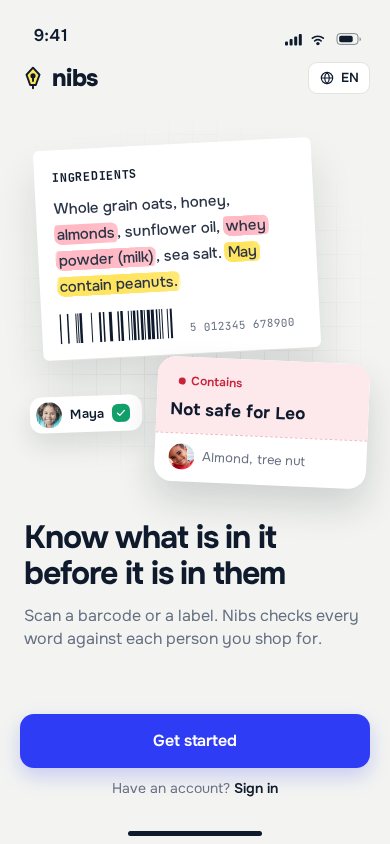
Nibs is a complete allergy scanner for a whole family: welcome, allergen setup and sign in, a home that scans for everyone at once, a live barcode and label scanner, a verdict with the ingredient list highlighted word by word, ingredient explainers, safe swaps and product pages, search, history, family profiles with emergency plans, a translated chef card for restaurants, a reaction log, insights, recalls, a safe groceries basket and order, a family plan, notifications, profile and settings. Paper white and ink navy with cobalt and three highlighter inks.
| Detail | Value |
|---|---|
| Screen type | Onboarding |
| App | Nibs: Food allergy and label scanner |
| Category | Food |
| Design language | Clinical, light |
| Type | JetBrains Mono for headings, Onest for text |
| Colours | #f3f4f1 background, #ffffff surface, #0f1b2d text, #677083 text-muted, #2f3cf5 accent, #ffffff accent-contrast, #ffe45c secondary, #e2e4de border, #e8384f danger |
What this screen says
- nibs
- EN
- INGREDIENTS
- Whole grain oats, honey, almonds , sunflower oil, whey powder (milk) , sea salt. May contain peanuts.
- Maya
- Contains Not safe for Leo
- Almond, tree nut
- Know what is in it before it is in them
- Scan a barcode or a label. Nibs checks every word against each person you shop for.
- Get started
- Have an account? Sign in
Around it in Nibs
More onboarding screens
- Tiffin Welcome: Food delivery
- Courier Welcome: Food delivery driver app
- Picker Welcome: Grocery shopper app
- Queue Welcome: Join the waitlist from anywhere
- Nosh Welcome: Local restaurant reviews
- Buns Welcome: Burger chain ordering and deals
- Slice Welcome: Pizza ordering with a live tracker
- Crate Welcome: Meal kits delivered weekly
- Dash Welcome: Ten minute grocery delivery
- Aisle Welcome: Shared grocery lists
- Menu Welcome: Scan, order and pay at the table
- Mart Welcome: Supermarket app with loyalty and scan and go
Every food app onboarding screen
What makes a good onboarding screen
- One idea per screen. Each screen should say one thing in a headline people can read in a second. If a screen needs a paragraph, it is doing too much.
- Personalise with a purpose. Ask a question only if the answer changes what people see next, like a goal, a level or an interest. Then show that the answer mattered.
- Explain permissions before asking. Show your own screen saying why you need notifications, location or the camera before the system prompt. People who understand the reason are more likely to allow it.
- Let people skip. A visible skip or "I'll do this later" respects returning users and the impatient. Make sure skipping still lands them somewhere useful.
The full onboarding screen guide and every example
Remix Nibs free: describe your own app and it is drawn in this design. Or get its files from $10: Figma, React Native, SwiftUI, Flutter and HTML.