Templates · Sign in and sign up screens · Education app · Zenith
Zenith Sign in screen
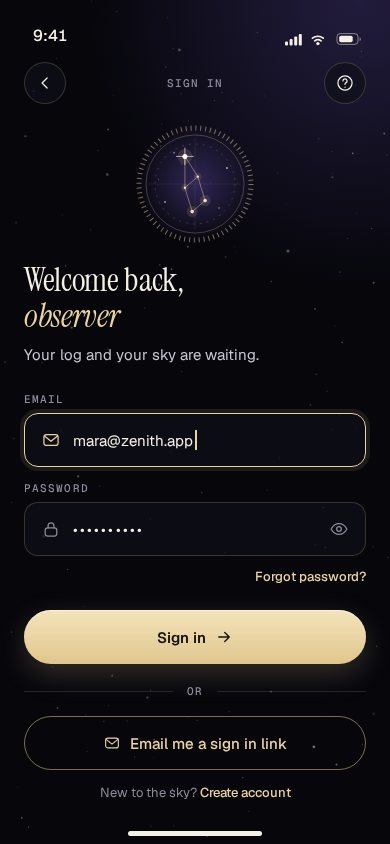
A sign in screen from Zenith, a night sky guide app template in a Dark-first style. Screen 2 of 25.
Zenith is a complete stargazing app: welcome, sign in, choosing an observing site, tonight's sky at a glance, a round sky map with a time ruler, search, planets and a planet page with an altitude curve, constellations and a constellation plate, a deep sky object, the moon, an events calendar and a meteor shower, the seeing forecast, a light pollution map, an observing log with a new entry and its confirmation, telescope tips with a step by step lesson, a Plus plan, notifications, profile and settings. Everything reads like an engraved star atlas lit in pale gold.
| Detail | Value |
|---|---|
| Screen type | Sign in |
| App | Zenith: Night sky guide |
| Category | Education |
| Design language | Dark-first, dark |
| Type | Geist |
| Colours | #06060b background, #101018 surface, #f5f0e6 text, #8f8b9c text-muted, #e9d3a0 accent, #17130a accent-contrast, #9d8cf0 secondary, #2a2620 border, #f0766a danger |
What this screen says
- Sign in
- Welcome back,
- observer
- Your log and your sky are waiting.
- mara@zenith.app
- Password
- ••••••••••
- Forgot password?
- or
- Email me a sign in link
- New to the sky? Create account
Around it in Zenith
More sign in and sign up screens
- Epoch Sign in: History on a timeline
- Wren Sign up: Early reading for kids
- Proof Sign in: Maths tutor that shows its working
- Skim Create account: Speed reading trainer
- Terra Sign in: Geography and flags quiz
- Gambit Sign in: Chess training
- Buzzer Sign in: Live trivia
- Homeroom Sign in: School, all on one page
- Parla Sign in: Language learning
- Recall Sign in: Flashcards and spaced repetition
- Numo Sign in: Kids maths game
- Syntax Sign in: Learn to code
Every education app sign in screen
What makes a good login screen
- Offer the fastest option first. Sign in with Apple, Google or a passkey takes one tap. If you support them, put them above the email form. Apple asks apps that use a third-party login like Google to also offer an equivalent privacy-focused option, such as Sign in with Apple.
- Separate sign in from sign up clearly. Use different headings and buttons, and a clear link to switch. People who already have an account should never end up creating a second one by accident.
- Use the right keyboard and autofill. Email fields should open the email keyboard and support password managers and one-time code autofill. Small details, big difference in how many people get through.
- Write errors that help. "That password doesn't match this email" is better than "Error 401". Keep what people typed so they only fix the part that was wrong.
The full login screen guide and every example
Remix Zenith free: describe your own app and it is drawn in this design. Or get its files from $10: Figma, React Native, SwiftUI, Flutter and HTML.