Templates · Sign in and sign up screens · Education app · Parla
Parla Sign in screen
A sign in screen from Parla, a language learning app template in a Playful style. Screen 4 of 25.
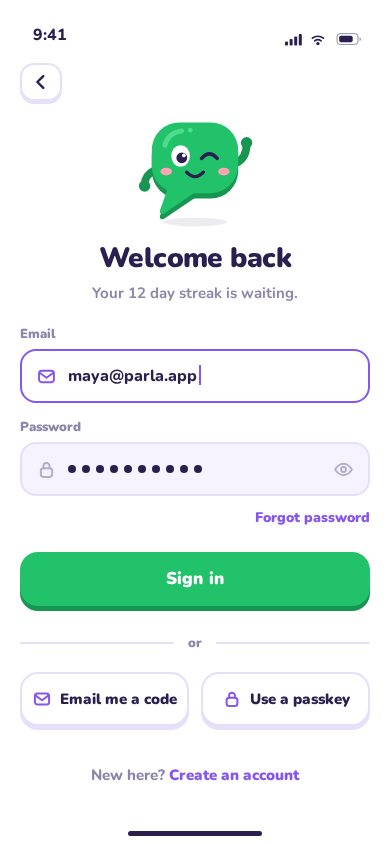
Parla is a complete language course in your pocket: welcome, picking a language and a daily goal, sign in, a winding path map of lessons, a unit guide, four exercise types (pick the word, build the sentence, match pairs, listen and type), a speaking exercise, a lesson complete moment, streaks, a review hub with flashcards, weekly leagues, a dictionary with word pages, quests, progress stats, a Plus plan, notifications, profile and settings. Green means right and go, purple means you and now, with yellow, coral and sky for points, hearts and gems.
| Detail | Value |
|---|---|
| Screen type | Sign in |
| App | Parla: Language learning |
| Category | Education |
| Design language | Playful, light |
| Type | Nunito |
| Colours | #ffffff background, #f6f2ff surface, #2a1f4e text, #8d85aa text-muted, #22c26a accent, #ffffff accent-contrast, #8656f0 secondary, #e6dffa border, #ff5b6e danger |
What this screen says
- Welcome back
- Your 12 day streak is waiting.
- maya@parla.app
- Password
- Forgot password
- Sign in
- or
- Email me a code
- Use a passkey
- New here? Create an account
Around it in Parla
More sign in and sign up screens
- Encore Sign in: Creator courses
- Classroom Sign in: Class stream and assignments
- Studyhall Sign in: Free lessons and practice for school
- Tutor Sign in: Book online tutors for any skill
- Leaf Sign in: E-books and reading
- Almanac Sign in: The free encyclopedia reader
- Tiles Sign in: Daily word and number puzzles
- Stacks Library card: Borrow e-books and audiobooks from your library
- Penpal Sign up: Language exchange chat
- Lexis Sign in: A word a day
- Quanta Sign in: Interactive physics lessons
- Cram Sign up: Exam prep and mock tests
Every education app sign in screen
What makes a good login screen
- Offer the fastest option first. Sign in with Apple, Google or a passkey takes one tap. If you support them, put them above the email form. Apple asks apps that use a third-party login like Google to also offer an equivalent privacy-focused option, such as Sign in with Apple.
- Separate sign in from sign up clearly. Use different headings and buttons, and a clear link to switch. People who already have an account should never end up creating a second one by accident.
- Use the right keyboard and autofill. Email fields should open the email keyboard and support password managers and one-time code autofill. Small details, big difference in how many people get through.
- Write errors that help. "That password doesn't match this email" is better than "Error 401". Keep what people typed so they only fix the part that was wrong.
The full login screen guide and every example
Remix Parla free: describe your own app and it is drawn in this design. Or get its files from $10: Figma, React Native, SwiftUI, Flutter and HTML.