Templates · Sign in and sign up screens · Education app · Gambit
Gambit Sign in screen
A sign in screen from Gambit, a chess training app template in a Luxury style. Screen 2 of 25.
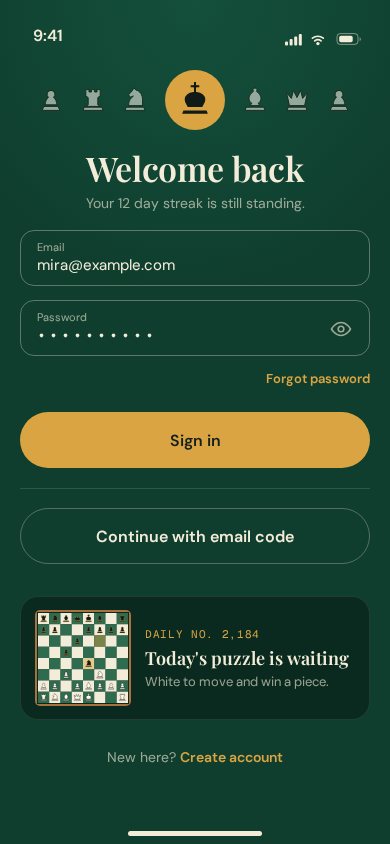
Gambit is a complete chess training app: welcome, sign in and picking your level, a home with the daily puzzle and streak, puzzles with a timed rush, lessons and an opening library with a tree for each line, playing a friend or a bot with live clocks, the result, game review with an engine bar, key moments and an analysis board, a rating graph, game history, friends, a club leaderboard, a Pro plan, profile and settings. Every board is drawn and every position is legal.
| Detail | Value |
|---|---|
| Screen type | Sign in |
| App | Gambit: Chess training |
| Category | Education |
| Design language | Luxury, dark |
| Type | DM Sans |
| Colours | #0f3d2e background, #0a2a20 surface, #f3ecd9 text, #a9b8a9 text-muted, #d9a441 accent, #14201b accent-contrast, #2f6b4f secondary, #285a45 border, #c8553d danger |
What this screen says
- Welcome back
- Your 12 day streak is still standing.
- Emailmira@example.com
- Password••••••••••
- Forgot password
- Sign in
- Continue with email code
- DAILY NO. 2,184Today's puzzle is waitingWhite to move and win a piece.
- New here? Create account
Around it in Gambit
More sign in and sign up screens
- Zenith Sign in: Night sky guide
- Chalk Sign in: Design courses
- Encore Sign in: Creator courses
- Classroom Sign in: Class stream and assignments
- Studyhall Sign in: Free lessons and practice for school
- Tutor Sign in: Book online tutors for any skill
- Leaf Sign in: E-books and reading
- Almanac Sign in: The free encyclopedia reader
- Tiles Sign in: Daily word and number puzzles
- Stacks Library card: Borrow e-books and audiobooks from your library
- Penpal Sign up: Language exchange chat
- Lexis Sign in: A word a day
Every education app sign in screen
What makes a good login screen
- Offer the fastest option first. Sign in with Apple, Google or a passkey takes one tap. If you support them, put them above the email form. Apple asks apps that use a third-party login like Google to also offer an equivalent privacy-focused option, such as Sign in with Apple.
- Separate sign in from sign up clearly. Use different headings and buttons, and a clear link to switch. People who already have an account should never end up creating a second one by accident.
- Use the right keyboard and autofill. Email fields should open the email keyboard and support password managers and one-time code autofill. Small details, big difference in how many people get through.
- Write errors that help. "That password doesn't match this email" is better than "Error 401". Keep what people typed so they only fix the part that was wrong.
The full login screen guide and every example
Remix Gambit free: describe your own app and it is drawn in this design. Or get its files from $10: Figma, React Native, SwiftUI, Flutter and HTML.