Templates · Search and explore screens · Social app · Wink
Wink Filters screen
A search screen from Wink, a video first dating app template in a Dark-first style. Screen 8 of 25.
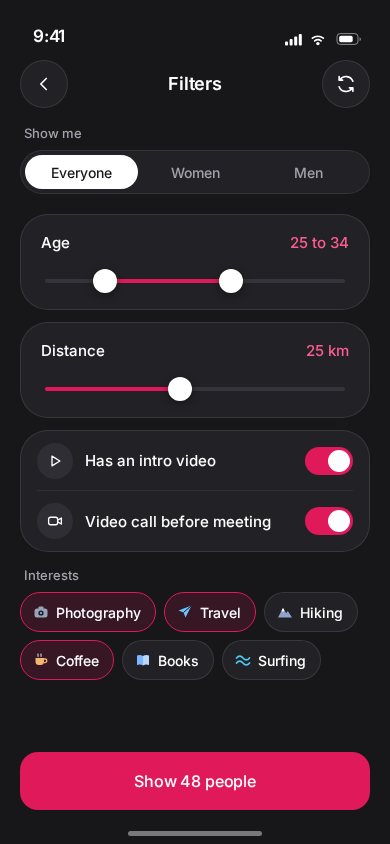
Wink is a complete video first dating app: welcome, sign in, a recorded intro video, interests, a home with stories and a swipe card, filters, discover, a profile with a match score, a match screen, likes, chats, incoming and live video calls, a call recap, planning a date, insights, a plus plan, notifications, your profile and settings. Charcoal black with one crimson pink and white.
| Detail | Value |
|---|---|
| Screen type | Search |
| App | Wink: Video first dating |
| Category | Social |
| Design language | Dark-first, dark |
| Type | Inter |
| Colours | #17171a background, #222226 surface, #ffffff text, #a2a2ab text-muted, #e0195a accent, #ffffff accent-contrast, #ffffff secondary, #34343a border, #ff5a5f danger |
What this screen says
- Filters
- Show me
- Everyone Women Men
- Age25 to 34
- Distance25 km
- Has an intro video
- Video call before meeting
- Interests
- Photography Travel Hiking Coffee Books Surfing
- Show 48 people
Around it in Wink
More search and explore screens
- Snoot Explore: Social app for pets
- Huddle Explore: Interest groups and meetups
- Glade Explore: Photo and clip social network
- Onair Search: Live streaming
- Drift Explore: Reels and voice rooms
- Hearth Search: Messenger for trips and circles
- Chirp Search: Messenger with file sharing
- Banter Search: Live messenger
- Natter New chat: Minimal messenger
- Nearly Explore: Dating by crossed paths
- Linkup Search: Professional network and jobs
- Quorum Search: Questions and expert answers
Every social app search screen
What makes a good search screen
- Show something before people type. Recent searches, popular items or categories make the empty search screen useful and save typing.
- Suggest as people type. Autocomplete with matching items, not only matching words, lets people jump straight to a result.
- Make filters visible and reversible. Show active filters as chips that can be removed in one tap, and the number of results as filters change.
- Forgive typos. Close matches and "Did you mean" stop a spelling mistake from ending in an empty screen.
The full search screen guide and every example
Remix Wink free: describe your own app and it is drawn in this design. Or get its files from $10: Figma, React Native, SwiftUI, Flutter and HTML.