Templates · Search and explore screens · Social app · Linkup
Linkup Search screen
A search screen from Linkup, a professional network and jobs app template in an Enterprise style. Screen 11 of 25.
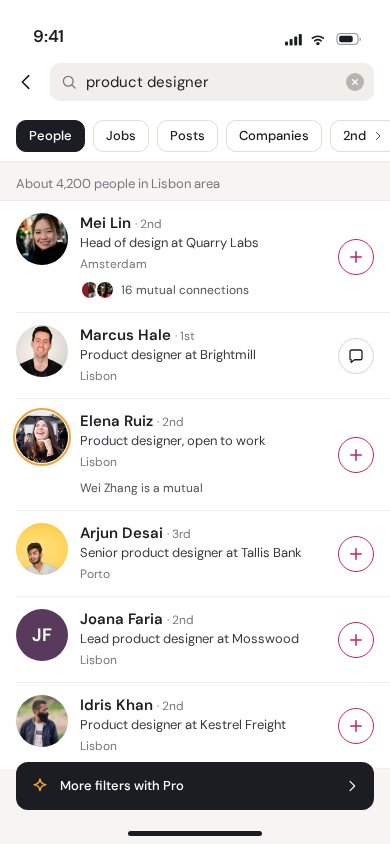
Linkup is a complete professional network: welcome, goals and sign in, a home feed of posts with reactions, a post with its comments, writing a post, your profile with experience, another member's profile, skills with endorsements, my network with invitations, people search, jobs with recommendations and filtered results, a job with a quick apply flow, review and confirmation, an applications tracker, messages and a conversation, notifications, who viewed your profile, a company page, a Pro plan and settings. Warm white and graphite with a single raspberry.
| Detail | Value |
|---|---|
| Screen type | Search |
| App | Linkup: Professional network and jobs |
| Category | Social |
| Design language | Enterprise, light |
| Type | Bricolage Grotesque for headings, DM Sans for text |
| Colours | #f6f5f3 background, #ffffff surface, #1c1d22 text, #7a767c text-muted, #c4245a accent, #fbe6ee accent-tint, #1c1d22 secondary, #f0a43a highlight, #ebe7e3 border, #2f8f6a success |
What this screen says
- product designer
- People Jobs Posts Companies 2nd
- About 4,200 people in Lisbon area
- Mei Lin · 2nd
- Head of design at Quarry Labs
- Amsterdam 16 mutual connections
- Marcus Hale · 1st
- Product designer at Brightmill
- Lisbon
- Elena Ruiz · 2nd
- Product designer, open to work
- LisbonWei Zhang is a mutual
- Arjun Desai · 3rd
- Senior product designer at Tallis Bank
- Porto
- JF
- Joana Faria · 2nd
- Lead product designer at Mosswood
- Idris Khan · 2nd
- Product designer at Kestrel Freight
- More filters with Pro
Around it in Linkup
More search and explore screens
- Cipher Search: Encrypted private messenger
- Commons Search: Friends, groups and events
- Tether Add place: Family location and safety
- Facet New call: Video calls with family and friends
- Stoop Search: Neighbourhood noticeboard
- Aura Find friends: Moods with close friends
- Kindly Explore: Volunteering near you
- Cohort Directory: Alumni and mentor network
- Kin Search: Private family circle
- Confetti Card designs: Party invites and RSVPs
- Ripple Explore: Voice notes social
- Duo Date ideas: An app for two
Every social app search screen
What makes a good search screen
- Show something before people type. Recent searches, popular items or categories make the empty search screen useful and save typing.
- Suggest as people type. Autocomplete with matching items, not only matching words, lets people jump straight to a result.
- Make filters visible and reversible. Show active filters as chips that can be removed in one tap, and the number of results as filters change.
- Forgive typos. Close matches and "Did you mean" stop a spelling mistake from ending in an empty screen.
The full search screen guide and every example
Remix Linkup free: describe your own app and it is drawn in this design. Or get its files from $10: Figma, React Native, SwiftUI, Flutter and HTML.