Templates · Search and explore screens · Social app · Huddle
Huddle Explore screen
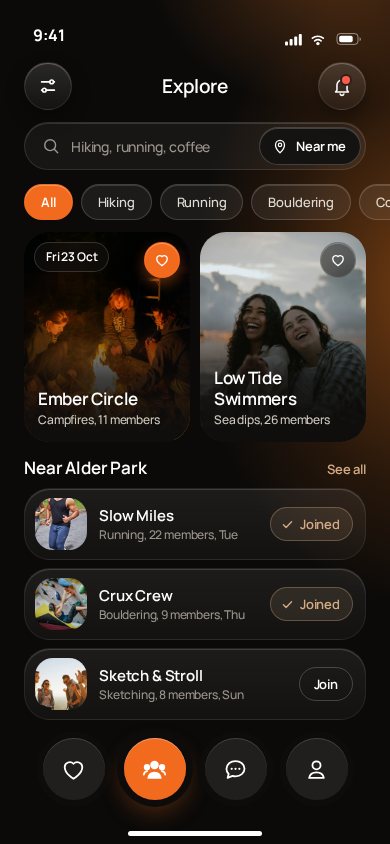
A search screen from Huddle, an interest groups and meetups app template in a Dark-first style. Screen 7 of 25.
Huddle is a complete app for interest groups that meet up: welcome, picking interests, sign in, a home with your groups and a featured photo card, explore, group pages and members, group chat with voice notes and shared photos, video hangouts, events with RSVPs and a live meeting point, activity stats, notifications, a plus plan, profile and settings. Black with a warm amber glow, tan and white type and one orange.
| Detail | Value |
|---|---|
| Screen type | Search |
| App | Huddle: Interest groups and meetups |
| Category | Social |
| Design language | Dark-first, dark |
| Type | Manrope |
| Colours | #0b0a09 background, #1b1a18 surface, #ffffff text, #9c958c text-muted, #f26a1e accent, #ffffff accent-contrast, #d2ab85 secondary, #2e2b27 border, #ff5a4d danger |
What this screen says
- Explore
- Hiking, running, coffee
- Near me
- All Hiking Running Bouldering Coffee
- Fri 23 Oct
- Ember CircleCampfires, 11 members
- Low Tide SwimmersSea dips, 26 members
- Near Alder ParkSee all
- Slow MilesRunning, 22 members, Tue
- Joined
- Crux CrewBouldering, 9 members, Thu
- Sketch & StrollSketching, 8 members, Sun
- Join
Around it in Huddle
More search and explore screens
- Guild Discover: Community servers with voice and text chat
- Parrot New chat: Private messaging, groups and calls
- Carrier Discover: Cloud messaging with channels
- Vista Explore: Photos, stories and reels
- Flick Discover: Short video feed
- Squawk Explore: Short posts and live conversation
- Agora Explore: Communities, threads and votes
- Spark Filters: Swipe dating
- Candid Discover: One real photo a day
- Blink Lenses: Camera chat and stories
- Cipher Search: Encrypted private messenger
- Commons Search: Friends, groups and events
Every social app search screen
What makes a good search screen
- Show something before people type. Recent searches, popular items or categories make the empty search screen useful and save typing.
- Suggest as people type. Autocomplete with matching items, not only matching words, lets people jump straight to a result.
- Make filters visible and reversible. Show active filters as chips that can be removed in one tap, and the number of results as filters change.
- Forgive typos. Close matches and "Did you mean" stop a spelling mistake from ending in an empty screen.
The full search screen guide and every example
Remix Huddle free: describe your own app and it is drawn in this design. Or get its files from $10: Figma, React Native, SwiftUI, Flutter and HTML.