Templates · Settings screens · Travel app · Wheelhouse
Wheelhouse Settings screen
A settings screen from Wheelhouse, a driver app for ride hailing app template in a Dark-first style. Screen 25 of 25.
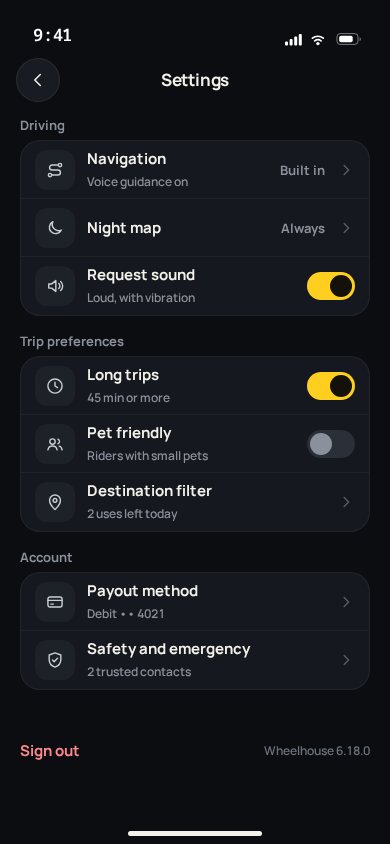
Wheelhouse is a complete ride hailing driver app: welcome and sign in, a home map with a slide to go online, the online state with a demand heat grid, an incoming trip request with fare and countdown, turn by turn navigation to the pickup, waiting at the pickup, rider messages, the trip in progress, trip complete and rating the rider, earnings by week and by day, a trip receipt, instant cash out, the demand map, a destination filter, promotions, a Pro plan, documents, the vehicle, notifications, profile and settings. Blue black asphalt with road marking yellow and mint.
| Detail | Value |
|---|---|
| Screen type | Settings |
| App | Wheelhouse: Driver app for ride hailing |
| Category | Travel |
| Design language | Dark-first, dark |
| Type | Space Grotesk for headings, Manrope for text |
| Colours | #0b0d11 background, #15181e surface, #f3f1ea text, #8b919c text-muted, #ffcf1f accent, #14110a accent-contrast, #5ce1a6 secondary, #262a32 border, #ff5a5f danger |
What this screen says
- Settings
- Driving
- Navigation
- Voice guidance on
- Built in
- Night map
- Always
- Request sound
- Loud, with vibration
- Trip preferences
- Long trips
- 45 min or more
- Pet friendly
- Riders with small pets
- Destination filter
- 2 uses left today
- Account
- Payout method
- Debit •• 4021
- Safety and emergency
- 2 trusted contacts
- Sign outWheelhouse 6.18.0
Around it in Wheelhouse
More settings screens
- Hail Settings: Ride hailing
- Volta Settings: EV charging
- Museo Settings: Museum guide
- Roamly Settings: Trips, stays and experiences
- Jaunt Settings: Bus, train and flight booking
- Spoke Settings: Bike sharing
- Navara Settings: Yacht charter
- Voya Settings: Travel booking
- Fuelup Settings: Pay at the pump and car wash
- Omnia Settings: Super app for rides, food and payments
- Staya Settings: Homes and stays from local hosts
- Lodge Settings: Hotels, deals and reservations
Every travel app settings screen
What makes a good settings screen
- Group options into clear sections. Account, notifications, privacy, appearance and help, with headings, so people scan to the right group.
- Label settings by their effect. "Daily reminder at 8:00" is clearer than "Reminders". Add a short description under options that need one.
- Use the right control. Toggles for on and off, a row that opens a list for choices, and sliders only for ranges.
- Apply changes immediately. Most mobile settings take effect when changed, with no Save button to forget.
The full settings screen guide and every example
Remix Wheelhouse free: describe your own app and it is drawn in this design. Or get its files from $10: Figma, React Native, SwiftUI, Flutter and HTML.