Templates · Settings screens · Travel app · Roamly
Roamly Settings screen
A settings screen from Roamly, a travel app template in a Playful style. Screen 25 of 25.
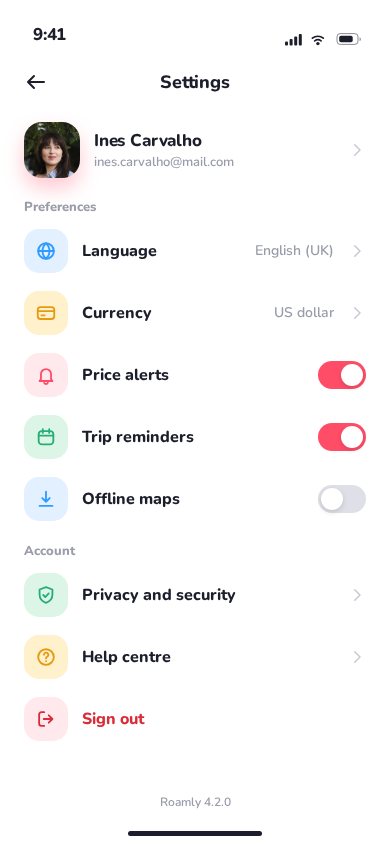
Roamly is a complete travel app: onboarding, sign in, a discover home with illustrated destination cards and categories, explore by type of trip, search and filters, destination, stay and experience details, a day by day tour plan, reviews, dates and guests, payment, a booking confirmation, trips, saved places, notifications, travel stats, a membership, profile and settings. White and coral red with a rounded font, tall photos and drawn travel illustrations.
| Detail | Value |
|---|---|
| Screen type | Settings |
| App | Roamly: Trips, stays and experiences |
| Category | Travel |
| Design language | Playful, light |
| Type | Nunito |
| Colours | #ffffff background, #f5f5f8 surface, #1c1e2b text, #9a9da9 text-muted, #ff4d67 accent, #ffffff accent-contrast, #2f9bff secondary, #ececf1 border, #d92d3a danger |
What this screen says
- Settings
- Ines Carvalhoines.carvalho@mail.com
- Preferences
- Language
- English (UK)
- Currency
- US dollar
- Price alerts
- Trip reminders
- Offline maps
- Account
- Privacy and security
- Help centre
- Sign out
- Roamly 4.2.0
Around it in Roamly
More settings screens
- Contrail Settings: Airline booking, check-in and boarding
- Keycard Settings: Hotel stays, digital key and room service
- Detour Car icon: Community driving navigation
- Convoy Settings: Carpooling between cities
- Manifest Settings: Trip plans from your confirmation emails
- Roadster Settings: Your electric car, from your phone
- Fairground Settings: Theme park tickets, wait times and map
- Scoot Settings: E-scooter and e-bike rental
- Nomad Settings: Travel eSIM data plans
- Tern Settings: Ferry and island hopping
- Berth Settings: Night trains and sleeper cabins
- Caravan Settings: Campervan rental and road trips
Every travel app settings screen
What makes a good settings screen
- Group options into clear sections. Account, notifications, privacy, appearance and help, with headings, so people scan to the right group.
- Label settings by their effect. "Daily reminder at 8:00" is clearer than "Reminders". Add a short description under options that need one.
- Use the right control. Toggles for on and off, a row that opens a list for choices, and sliders only for ranges.
- Apply changes immediately. Most mobile settings take effect when changed, with no Save button to forget.
The full settings screen guide and every example
Remix Roamly free: describe your own app and it is drawn in this design. Or get its files from $10: Figma, React Native, SwiftUI, Flutter and HTML.