Templates · Form and input screens · Lifestyle app · Vidi
Vidi Details screen
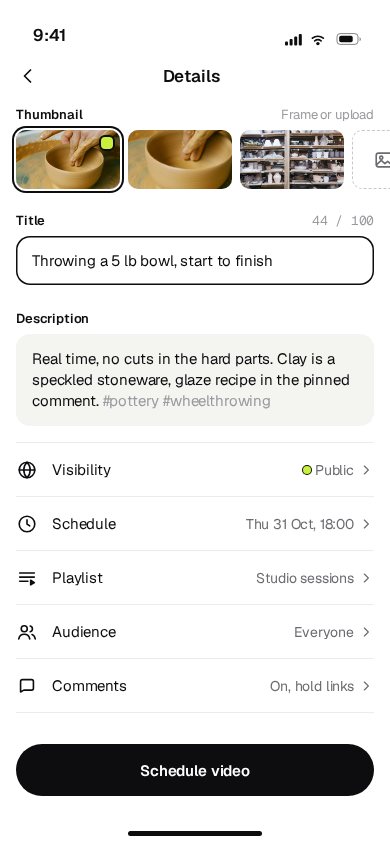
A form screen from Vidi, a video platform for creators app template in a Minimal style. Screen 17 of 25.
Vidi is a complete video app for watching and making: welcome, topics, sign in, a home feed, the player with chapters and up next, comments, vertical clips, live with chat, search and results, channels, following, library, playlists and downloads, then the creator side: trim an upload, add details, publish, a studio dashboard and per video stats. Channel memberships, a premium plan, notifications, profile and settings. White and warm grey with ink black and one acid lime accent.
| Detail | Value |
|---|---|
| Screen type | Form |
| App | Vidi: Video platform for creators |
| Category | Lifestyle |
| Design language | Minimal, light |
| Type | Instrument Serif for headings, Geist for text |
| Colours | #ffffff background, #f4f4f1 surface, #0d0d0f text, #6b6b70 text-muted, #c8f03c accent, #0d0d0f accent-contrast, #ececea border, #ff4a3d danger |
What this screen says
- Details
- ThumbnailFrame or upload
- Title44 / 100
- Throwing a 5 lb bowl, start to finish
- Description
- Real time, no cuts in the hard parts. Clay is a speckled stoneware, glaze recipe in the pinned comment. #pottery...
- Visibility Public
- Schedule Thu 31 Oct, 18:00
- Playlist Studio sessions
- Audience Everyone
- Comments On, hold links
- Schedule video
Around it in Vidi
More form and input screens
- Bazaar Make offer: Local buy and sell
- Kiln Filters: Handmade marketplace
- Drape Sizes and fit: AI wardrobe and daily outfits
- Mane Hair profile: AI hairstyle try-on
- Annex Room type: AI interior redesign
- Kino Rate: Film and series streaming
- Stitch Add yarn: A knitting companion drawn as one big knitting chart
- Roost Add item: Your shared house, stuck to the fridge door
- Grain Export: Camera and photo editor
- Posy Build a bouquet: Flower delivery and weekly stems
- Fern Log watering: Plant care
- Doorstep Filters: Homes for sale and rent
Every lifestyle app form screen
What makes a good form screen
- Ask only what you need. Every field is a reason to stop. Remove optional fields or move them to later.
- Labels above fields. Visible labels stay readable while people type; placeholder-only labels disappear.
- Use the right keyboard and input. Number pads for amounts, email keyboards for email, pickers for dates and autofill for addresses and codes.
- Validate as people go. Show problems next to the field when people leave it, in words that say how to fix them.
The full form screen guide and every example
Remix Vidi free: describe your own app and it is drawn in this design. Or get its files from $10: Figma, React Native, SwiftUI, Flutter and HTML.