Templates · Player, camera and editor screens · Lifestyle app · Vidi
Vidi Upload screen
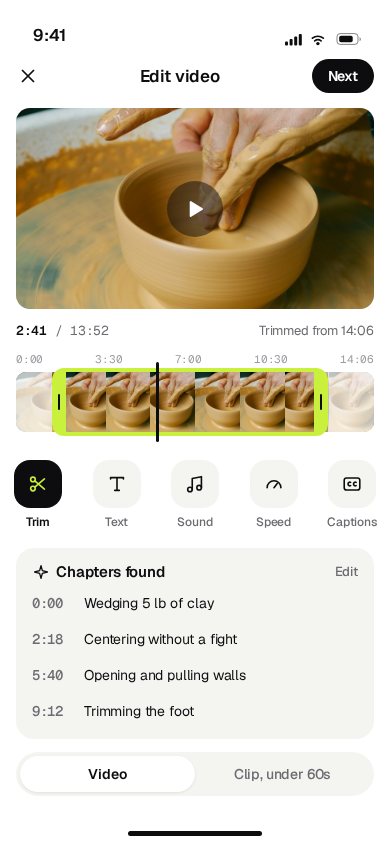
A media screen from Vidi, a video platform for creators app template in a Minimal style. Screen 16 of 25.
Vidi is a complete video app for watching and making: welcome, topics, sign in, a home feed, the player with chapters and up next, comments, vertical clips, live with chat, search and results, channels, following, library, playlists and downloads, then the creator side: trim an upload, add details, publish, a studio dashboard and per video stats. Channel memberships, a premium plan, notifications, profile and settings. White and warm grey with ink black and one acid lime accent.
| Detail | Value |
|---|---|
| Screen type | Media |
| App | Vidi: Video platform for creators |
| Category | Lifestyle |
| Design language | Minimal, light |
| Type | Instrument Serif for headings, Geist for text |
| Colours | #ffffff background, #f4f4f1 surface, #0d0d0f text, #6b6b70 text-muted, #c8f03c accent, #0d0d0f accent-contrast, #ececea border, #ff4a3d danger |
What this screen says
- Edit video
- Next
- 2:41 / 13:52 Trimmed from 14:06
- Trim
- Text
- Sound
- Speed
- Captions
- Chapters foundEdit
- 0:00Wedging 5 lb of clay
- 2:18Centering without a fight
- 5:40Opening and pulling walls
- 9:12Trimming the foot
- Video Clip, under 60s
Around it in Vidi
More player, camera and editor screens
- Dorm Virtual tour: Find student housing
- Hem Fit photo: Tailoring and alterations, collected
- Stub Ticket: Fan to fan ticket resale
- Trove Lens: Visual ideas and boards
- Roll Photo: Photo library and backups
- Splice Record: Video editor for short clips
- Blush Try on: Beauty and makeup shopping
- Flatpack Room preview: Furniture store with room previews
- Column Listen: Newsletters and independent writers
- Fetch Photos: Dog walkers and pet sitters
- Forecourt Gallery: Buy and sell used cars
- Haul Spin: Bargain fashion and finds
Every lifestyle app media screen
What makes a good media player screen
- Content takes the space. Artwork, video or the camera view should fill most of the screen.
- Primary controls in the thumb zone. Play and pause, the shutter or the main tool, large and low on the screen.
- Show progress and position. A scrubber with elapsed and remaining time, or the step in a lesson.
- Hide secondary controls until needed. Lyrics, queue, filters and advanced tools can live behind a tap or a swipe.
The full media player screen guide and every example
Remix Vidi free: describe your own app and it is drawn in this design. Or get its files from $10: Figma, React Native, SwiftUI, Flutter and HTML.