Templates · Form and input screens · Lifestyle app · Mane
Mane Hair profile screen
A form screen from Mane, an AI hairstyle try-on app template in a Glass style. Screen 6 of 25.
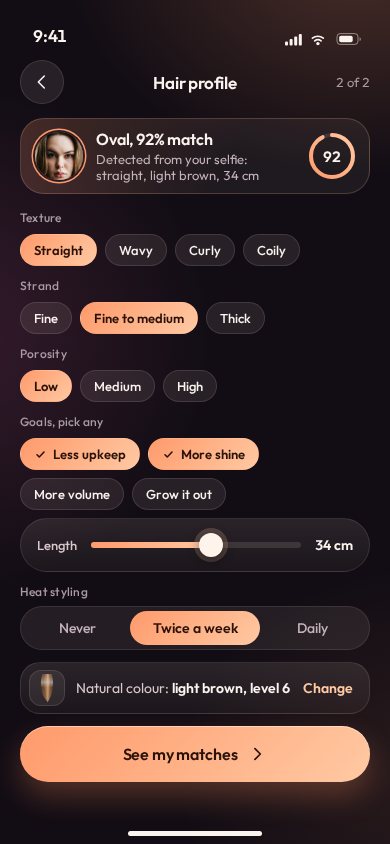
Mane is a complete AI hairstyle app: a selfie guide, camera and face scan, a face shape result with proportion bars, a hair profile, a home with today's top match, style pages with match, upkeep and length, try on, a split compare, a colour lab with glossy shade strands, length and fringe, beard, saved looks, a barber card with guard numbers, trends, collections, a care routine, a growth tracker, reminders, salons, a paywall and settings. Dark plum with warm glass, copper, peach and cream.
| Detail | Value |
|---|---|
| Screen type | Form |
| App | Mane: AI hairstyle try-on |
| Category | Lifestyle |
| Design language | Glass, dark |
| Type | Outfit |
| Colours | #120d14 background, #231a26 surface, #fbf3ee text, #ab9aa3 text-muted, #ff9a6b accent, #2a1208 accent-contrast, #ffc9a3 secondary, #3a2d3c border, #ff7a7a danger |
What this screen says
- Hair profile2 of 2
- Oval, 92% match
- Detected from your selfie: straight, light brown, 34 cm
- Texture
- Straight Wavy Curly Coily
- Strand
- Fine Fine to medium Thick
- Porosity
- Low Medium High
- Goals, pick any
- Less upkeep More shine More volume Grow it out
- Length
- 34 cm
- Heat styling
- Never Twice a week Daily
- Natural colour: light brown, level 6
- Change
- See my matches
Around it in Mane
More form and input screens
- Fern Log watering: Plant care
- Doorstep Filters: Homes for sale and rent
- Rewear Make an offer: Secondhand fashion marketplace
- Laced Release alert: Sneaker drops and raffles
- Gloss Write a review: Salon and spa booking
- Vow Add expense: Wedding planner
- Drizzle Edit widget: Weather with living skies
- Shelf Log progress: Reading tracker and book club
- Marquee Write a review: Cinema tickets and watchlist
- Handy Address: Home services
- Tasker Task details: Book and do local odd jobs
- Toolbox Calculator: Hardware store and project lists
Every lifestyle app form screen
What makes a good form screen
- Ask only what you need. Every field is a reason to stop. Remove optional fields or move them to later.
- Labels above fields. Visible labels stay readable while people type; placeholder-only labels disappear.
- Use the right keyboard and input. Number pads for amounts, email keyboards for email, pickers for dates and autofill for addresses and codes.
- Validate as people go. Show problems next to the field when people leave it, in words that say how to fix them.
The full form screen guide and every example
Remix Mane free: describe your own app and it is drawn in this design. Or get its files from $10: Figma, React Native, SwiftUI, Flutter and HTML.