Templates · Form and input screens · Lifestyle app · Annex
Annex Room type screen
A form screen from Annex, an AI interior redesign app template in a Minimal style. Screen 6 of 25.
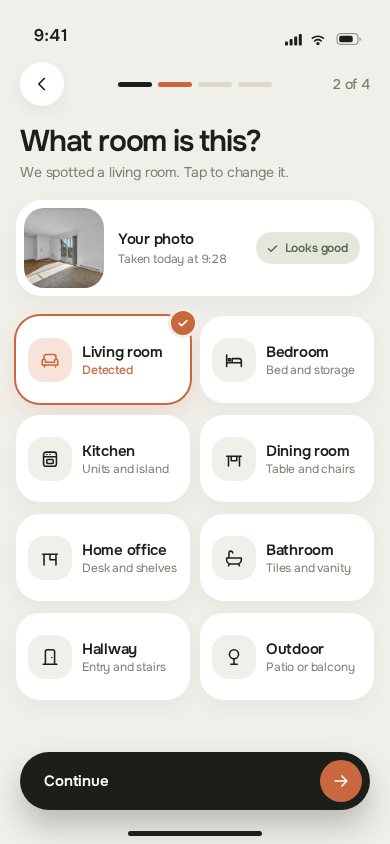
Annex is a complete AI interior redesign app: onboarding, sign in, a home with the room in progress, a four step flow from the photo to room type, style, palette and budget, a generating screen, four results, a before and after you can drag, refine with a prompt, erase and replace, shop the look with numbered items, a moodboard, projects, a community feed, saved designs, credits, a paywall, profile and settings. Warm stone and white with olive black and clay.
| Detail | Value |
|---|---|
| Screen type | Form |
| App | Annex: AI interior redesign |
| Category | Lifestyle |
| Design language | Minimal, light |
| Type | Onest |
| Colours | #f1efea background, #ffffff surface, #1c1f18 text, #7d7f73 text-muted, #c9683f accent, #ffffff accent-contrast, #5d6b4c secondary, #e3e0d8 border, #b8452f danger |
What this screen says
- 2 of 4
- What room is this?
- We spotted a living room. Tap to change it.
- Your photo
- Taken today at 9:28
- Looks good
- Living room
- Detected
- Bedroom
- Bed and storage
- Kitchen
- Units and island
- Dining room
- Table and chairs
- Home office
- Desk and shelves
- Bathroom
- Tiles and vanity
- Hallway
- Entry and stairs
- Outdoor
- Patio or balcony
- Continue
Around it in Annex
More form and input screens
- Blush Filters: Beauty and makeup shopping
- Flatpack Assembly: Furniture store with room previews
- Column Compose: Newsletters and independent writers
- Fetch Add pet: Dog walkers and pet sitters
- Forecourt Finance: Buy and sell used cars
- Tower Top up: Mobile plan, data and bills
- Haul Return item: Bargain fashion and finds
- Muse Prompt: AI image studio
- Admit Transfer: Events and tickets near you
- Arcade Install: Game store, library and friends
- Natal New entry: Birth charts and daily astrology
- Sillage Log wear: Fragrance wardrobe
Every lifestyle app form screen
What makes a good form screen
- Ask only what you need. Every field is a reason to stop. Remove optional fields or move them to later.
- Labels above fields. Visible labels stay readable while people type; placeholder-only labels disappear.
- Use the right keyboard and input. Number pads for amounts, email keyboards for email, pickers for dates and autofill for addresses and codes.
- Validate as people go. Show problems next to the field when people leave it, in words that say how to fix them.
The full form screen guide and every example
Remix Annex free: describe your own app and it is drawn in this design. Or get its files from $10: Figma, React Native, SwiftUI, Flutter and HTML.