Templates · Form and input screens · Lifestyle app · Doorstep
Doorstep Filters screen
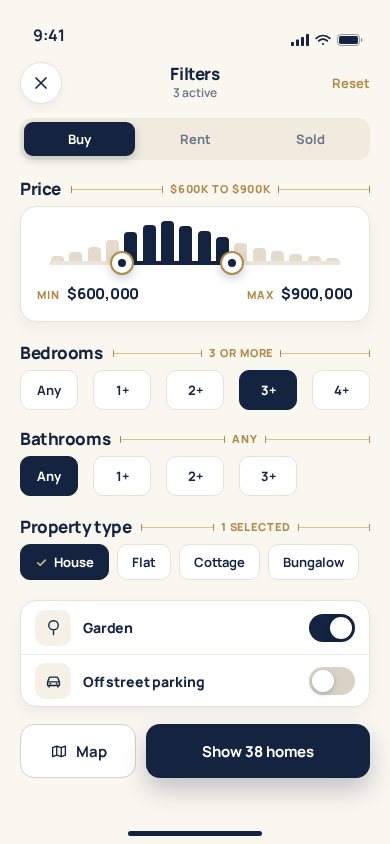
A form screen from Doorstep, a homes for sale and rent app template in an Enterprise style. Screen 7 of 25.
Doorstep is a complete property search app: welcome, sign in and a search brief, a home with new matches and viewings, map search with price pins, filters and results, a listing with gallery, drawn floor plan and area price trends, a mortgage calculator, booking a viewing, saved homes, search alerts, agent chat and profiles, a Plus plan, notifications and settings. Warm white with navy, brass hairlines and architect's dimension marks.
| Detail | Value |
|---|---|
| Screen type | Form |
| App | Doorstep: Homes for sale and rent |
| Category | Lifestyle |
| Design language | Enterprise, light |
| Type | Manrope |
| Colours | #faf7f1 background, #ffffff surface, #14233f text, #6b7385 text-muted, #14233f accent, #ffffff accent-contrast, #b08a4a secondary, #e8e1d4 border, #b8483a danger |
What this screen says
- Filters3 active
- Reset
- Buy Rent Sold
- Price$600k to $900k
- Min$600,000 Max$900,000
- Bedrooms3 or more
- Any 1+ 2+ 3+ 4+
- Bathroomsany
- Any 1+ 2+ 3+
- Property type1 selected
- House Flat Cottage Bungalow
- Garden
- Off street parking
- Map
- Show 38 homes
Around it in Doorstep
More form and input screens
- Specs Lenses: Glasses with virtual try-on
- Circuit Trade in: Electronics store with trade-in and repairs
- Provenance Make an offer: Authenticated luxury resale
- Gavel Max bid: Live online auctions
- Tidy Your home: Book home cleaners
- Dorm Filters: Find student housing
- Hem Alteration: Tailoring and alterations, collected
- Lendly Return: Borrow things from neighbours
- Stub Transfer: Fan to fan ticket resale
- Trove Save: Visual ideas and boards
- Vidi Details: Video platform for creators
- Roll New album: Photo library and backups
Every lifestyle app form screen
What makes a good form screen
- Ask only what you need. Every field is a reason to stop. Remove optional fields or move them to later.
- Labels above fields. Visible labels stay readable while people type; placeholder-only labels disappear.
- Use the right keyboard and input. Number pads for amounts, email keyboards for email, pickers for dates and autofill for addresses and codes.
- Validate as people go. Show problems next to the field when people leave it, in words that say how to fix them.
The full form screen guide and every example
Remix Doorstep free: describe your own app and it is drawn in this design. Or get its files from $10: Figma, React Native, SwiftUI, Flutter and HTML.