Templates · Form and input screens · Music app · Verse
Verse Co-write screen
A form screen from Verse, a songwriting notebook app template in a Minimal style. Screen 19 of 25.
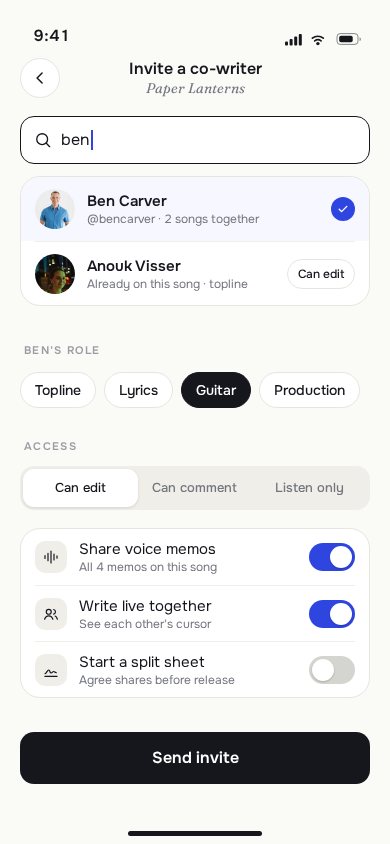
Verse is a complete songwriting notebook: welcome, setup and sign in, a notebook home with today's prompt and songs in progress, a song library, a song page, a lyric editor with chords, syllable counts and rhyme letters, a rhyme finder, a chord progression builder, song structure, voice memo recording and playback with a transcript, ideas and quick capture, search, writing stats, co-writing with a split sheet and its signed confirmation, a Pro plan, activity, profile and settings. Paper white and ink with ballpoint blue and highlighter yellow.
| Detail | Value |
|---|---|
| Screen type | Form |
| App | Verse: Songwriting notebook |
| Category | Music |
| Design language | Minimal, light |
| Type | Fraunces for headings, Onest for text |
| Colours | #fafaf7 background, #ffffff surface, #16171d text, #74767f text-muted, #2f45e0 accent, #ffffff accent-contrast, #ffe25c secondary, #e6e5df border, #ff5a45 danger |
What this screen says
- Invite a co-writer
- Paper Lanterns
- ben
- Ben Carver
- @bencarver · 2 songs together
- Anouk Visser
- Already on this song · topline
- Can edit
- BEN'S ROLE
- Topline Lyrics Guitar Production
- ACCESS
- Can edit Can comment Listen only
- Share voice memosAll 4 memos on this song
- Write live togetherSee each other's cursor
- Start a split sheetAgree shares before release
- Send invite
Around it in Verse
More form and input screens
- Strum Practice reminder: Learn guitar, one chord at a time
- Gigly Filters: Gig and festival tickets
- Padd New beat: Beat maker
- Aria Sleep timer: Audiobook library
- Hum Share: Song recognition
- Riff Upload: Upload and discover new tracks
- Groove Add record: Vinyl collection and crate digging
- Crossfade Save mix: DJ mixing on the go
- Fork Custom tuning: Tuner and metronome
- Belt Request: Karaoke nights
- Crowd Log a show: Concert diary and setlists
- Dial Request: Internet radio from everywhere
What makes a good form screen
- Ask only what you need. Every field is a reason to stop. Remove optional fields or move them to later.
- Labels above fields. Visible labels stay readable while people type; placeholder-only labels disappear.
- Use the right keyboard and input. Number pads for amounts, email keyboards for email, pickers for dates and autofill for addresses and codes.
- Validate as people go. Show problems next to the field when people leave it, in words that say how to fix them.
The full form screen guide and every example
Remix Verse free: describe your own app and it is drawn in this design. Or get its files from $10: Figma, React Native, SwiftUI, Flutter and HTML.