Templates · Form and input screens · Music app · Groove
Groove Add record screen
A form screen from Groove, a vinyl collection and crate digging app template in a Luxury style. Screen 10 of 25.
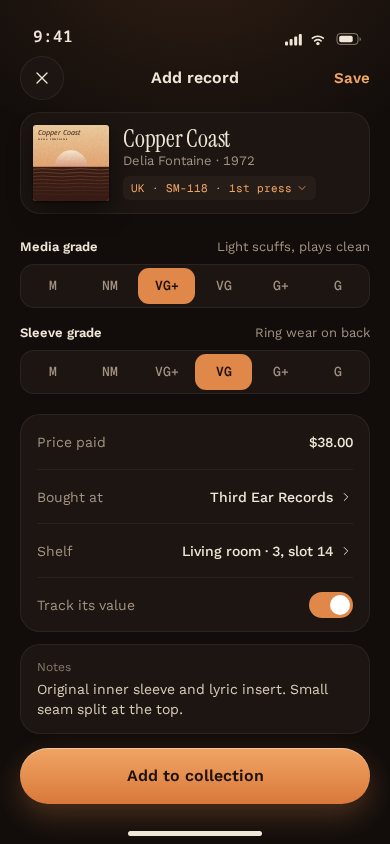
Groove is a complete vinyl app: welcome, tastes and sign in, a home with the record now spinning and the collection's value, a cover grid of the collection, a record page with grades, matrix and value, every pressing of a release, a turntable now spinning screen, scanning a sleeve and adding it with media and sleeve grades, dig and search across independent shops, an artist, a shop listing, a record shop, basket, checkout, order placed and a live shipment, listening stats, a wantlist with price targets, notifications, a Reserve plan, profile and settings. Walnut black and ivory with a cognac accent and twelve original album covers.
| Detail | Value |
|---|---|
| Screen type | Form |
| App | Groove: Vinyl collection and crate digging |
| Category | Music |
| Design language | Luxury, dark |
| Type | Instrument Serif for headings, Work Sans for text |
| Colours | #120d0b background, #1c1512 surface, #f1e7d8 text, #a39282 text-muted, #e0874a accent, #1f120a accent-contrast, #9fc29a secondary, #2a201b border, #e5604d danger |
What this screen says
- Add record
- Save
- Copper Coast
- Delia Fontaine · 1972
- UK · SM-118 · 1st press
- Media grade Light scuffs, plays clean
- M NM VG+ VG G+ G
- Sleeve grade Ring wear on back
- Price paid$38.00
- Bought atThird Ear Records
- ShelfLiving room · 3, slot 14
- Track its value
- NotesOriginal inner sleeve and lyric insert. Small seam split at the top.
- Add to collection
Around it in Groove
More form and input screens
- Strum Practice reminder: Learn guitar, one chord at a time
- Gigly Filters: Gig and festival tickets
- Padd New beat: Beat maker
- Aria Sleep timer: Audiobook library
- Hum Share: Song recognition
- Riff Upload: Upload and discover new tracks
- Crossfade Save mix: DJ mixing on the go
- Fork Custom tuning: Tuner and metronome
- Belt Request: Karaoke nights
- Crowd Log a show: Concert diary and setlists
- Dial Request: Internet radio from everywhere
- Chorus Book a session: Singing lessons and pitch training
What makes a good form screen
- Ask only what you need. Every field is a reason to stop. Remove optional fields or move them to later.
- Labels above fields. Visible labels stay readable while people type; placeholder-only labels disappear.
- Use the right keyboard and input. Number pads for amounts, email keyboards for email, pickers for dates and autofill for addresses and codes.
- Validate as people go. Show problems next to the field when people leave it, in words that say how to fix them.
The full form screen guide and every example
Remix Groove free: describe your own app and it is drawn in this design. Or get its files from $10: Figma, React Native, SwiftUI, Flutter and HTML.