Templates · Form and input screens · Music app · Crossfade
Crossfade Save mix screen
A form screen from Crossfade, a DJ mixing on the go app template in a Dark-first style. Screen 14 of 25.
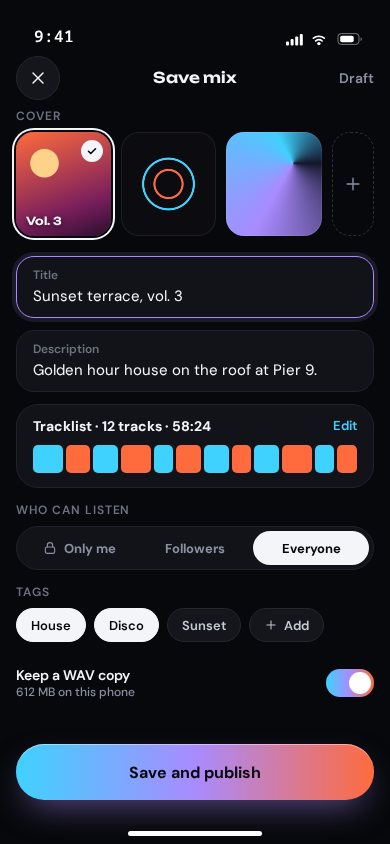
Crossfade is a complete DJ app for the phone: welcome, pick your sound, sign in, a home with your last session and smart crates, two live decks with waveforms, sync and a crossfader, an FX rack, performance pads, the library, search by BPM and key, a track page, crates, harmonic next up suggestions, live recording, saving and publishing a mix, mix playback with a tracklist, practice stats, a transition review, a track store with a cart, notifications, a Pro plan, profile and settings. Near black with ice blue, ember orange and the violet blend between them.
| Detail | Value |
|---|---|
| Screen type | Form |
| App | Crossfade: DJ mixing on the go |
| Category | Music |
| Design language | Dark-first, dark |
| Type | Unbounded for headings, DM Sans for text |
| Colours | #07080b background, #111318 surface, #f4f5f8 text, #8a90a0 text-muted, #3fd2ff accent, #07080b accent-contrast, #ff6b3d secondary, #1f222a border, #ff4d6a danger |
What this screen says
- Save mix
- Draft
- COVER
- Vol. 3
- Title
- Sunset terrace, vol. 3
- Description
- Golden hour house on the roof at Pier 9.
- Tracklist · 12 tracks · 58:24Edit
- WHO CAN LISTEN
- Only me
- Followers
- Everyone
- TAGS
- House Disco Sunset Add
- Keep a WAV copy612 MB on this phone
- Save and publish
Around it in Crossfade
More form and input screens
- Aria Sleep timer: Audiobook library
- Hum Share: Song recognition
- Riff Upload: Upload and discover new tracks
- Groove Add record: Vinyl collection and crate digging
- Fork Custom tuning: Tuner and metronome
- Belt Request: Karaoke nights
- Crowd Log a show: Concert diary and setlists
- Dial Request: Internet radio from everywhere
- Chorus Book a session: Singing lessons and pitch training
- Verse Write: Songwriting notebook
- Masters Withdraw: Royalties and streams for artists
- Sonata Build a series: Concert hall season and tickets
What makes a good form screen
- Ask only what you need. Every field is a reason to stop. Remove optional fields or move them to later.
- Labels above fields. Visible labels stay readable while people type; placeholder-only labels disappear.
- Use the right keyboard and input. Number pads for amounts, email keyboards for email, pickers for dates and autofill for addresses and codes.
- Validate as people go. Show problems next to the field when people leave it, in words that say how to fix them.
The full form screen guide and every example
Remix Crossfade free: describe your own app and it is drawn in this design. Or get its files from $10: Figma, React Native, SwiftUI, Flutter and HTML.