Templates · Paywall screens · Productivity app · Tunnel
Tunnel Plans screen
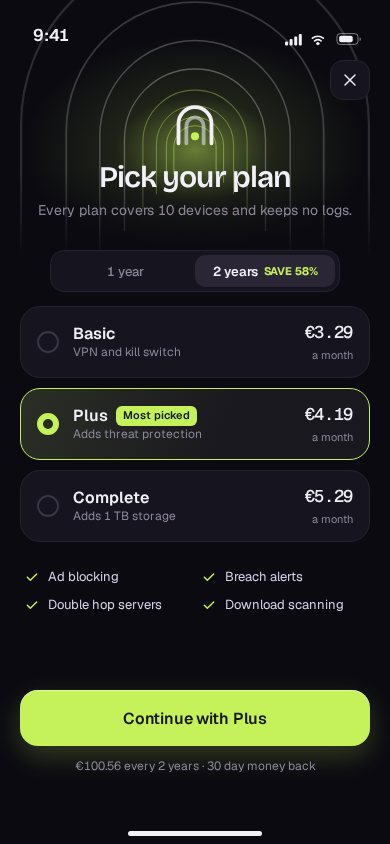
A paywall screen from Tunnel, a VPN and online privacy app template in a Dark-first style. Screen 20 of 25.
Tunnel is a complete VPN and privacy app: welcome, sign in and VPN permission, a one tap connect home inside a glowing tunnel, the connecting handshake, a dot matrix server map, a country list and a country with its cities, live connection details, specialty servers and double hop, protocols, kill switch, split tunnelling, threat protection with a blocked log, a data breach monitor and a leak, a speed test, plans, checkout and a success screen, notifications, account and settings. Aubergine black and plum graphite with signal lime and lavender.
| Detail | Value |
|---|---|
| Screen type | Paywall |
| App | Tunnel: VPN and online privacy |
| Category | Productivity |
| Design language | Dark-first, dark |
| Type | Bricolage Grotesque for headings, Geist for text |
| Colours | #0b0a11 background, #16141e surface, #f2f0f7 text, #8d879b text-muted, #c5f25a accent, #141a05 accent-contrast, #a796ff secondary, #26222f border, #ff6b5b danger |
What this screen says
- Pick your plan
- Every plan covers 10 devices and keeps no logs.
- 1 year 2 years SAVE 58%
- BasicVPN and kill switch
- €3.29a month
- PlusMost pickedAdds threat protection
- €4.19a month
- CompleteAdds 1 TB storage
- €5.29a month
- Ad blocking
- Breach alerts
- Double hop servers
- Download scanning
- Continue with Plus
- €100.56 every 2 years · 30 day money back
Around it in Tunnel
More paywall screens
- Polish Pro: Writing assistant and keyboard
- Tapline Pro: Link-in-bio pages and analytics
- Quill Plus: Docs, wikis and databases in one workspace
- Tandem Pro: Team chat, channels and huddles
- Shipyard Plans: Issue tracking for product teams
- Canvas Plans: Design files and comments on mobile
- Merge Pro: Code, pull requests and reviews
- Query Pro: AI answers with sources
- Glossa Pro: Translate text, voice and camera
- Layout Pro: Design anything from templates
- Tick Pro: To-do lists and reminders
- Beacon Plus: Find your devices and people
Every productivity app paywall screen
What makes a good paywall screen
- Lead with the outcome, not the feature list. The headline should say what changes for the person: "Train smarter every week" beats "Unlock Premium". Three to five benefits underneath are enough; more turns into a wall of ticks nobody reads.
- Show the real price, period and trial terms. State the price, how often it renews and when a free trial turns into a charge, near the button. Apple's App Store guideline 3.1.2 asks subscription apps to make this clear before purchase, and Google Play has similar rules.
- One primary button. The main call to action should be impossible to miss and say what happens: "Start 7-day free trial" or "Subscribe for $4.99/month". A second plan choice is fine; a second competing button is not.
- Make the plans easy to compare. When you offer monthly and yearly, show both prices in the same unit (per month or per week) and mark the saving on the yearly plan in plain numbers, not just a badge.
The full paywall screen guide and every example
Remix Tunnel free: describe your own app and it is drawn in this design. Or get its files from $10: Figma, React Native, SwiftUI, Flutter and HTML.