Templates · Paywall screens · Productivity app · Quill
Quill Plus screen
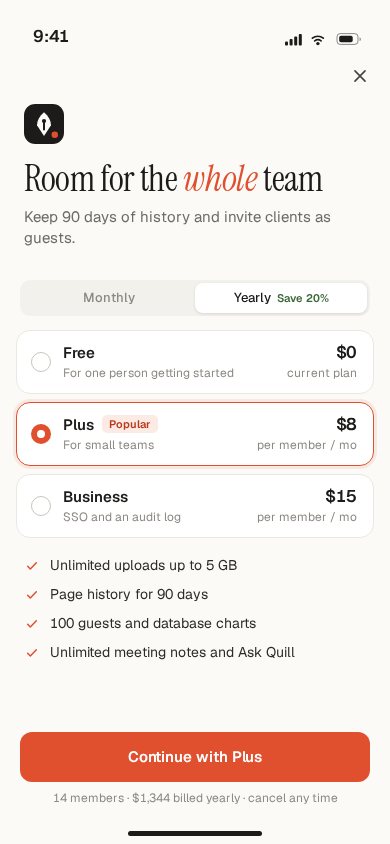
A paywall screen from Quill, a productivity app template in a Minimal style. Screen 21 of 25.
Quill is a complete everyday workspace: welcome and sign in with a code, a home with recent pages, events and my tasks, the page tree, a doc with cover, properties, to-dos, a callout and toggles, the slash menu over the keyboard, a verified team wiki, a database as a table, a board and a calendar, a task with properties and comments, a new task form, filters and sorts, search, templates, live meeting notes with a transcript, an assistant that answers from your pages, sharing, the inbox, workspace analytics, plans, checkout and a confirmation, account and settings. Paper white and ink with a vermilion accent.
| Detail | Value |
|---|---|
| Screen type | Paywall |
| App | Quill: Docs, wikis and databases in one workspace |
| Category | Productivity |
| Design language | Minimal, light |
| Type | Instrument Serif for headings, Geist for text |
| Colours | #fbfaf7 background, #ffffff surface, #1c1b19 text, #8c8982 text-muted, #e04f2e accent, #ffffff accent-contrast, #f3f1ec secondary, #ebe8e1 border, #b83a1d danger |
What this screen says
- Room for the whole team
- Keep 90 days of history and invite clients as guests.
- Monthly Yearly Save 20%
- FreeFor one person getting started
- $0current plan
- PlusPopularFor small teams
- $8per member / mo
- BusinessSSO and an audit log
- $15per member / mo
- Unlimited uploads up to 5 GB
- Page history for 90 days
- 100 guests and database charts
- Unlimited meeting notes and Ask Quill
- Continue with Plus
- 14 members · $1,344 billed yearly · cancel any time
Around it in Quill
More paywall screens
- Scanly Pro: Document scanner
- Keyring Plus: Password manager
- Inkwell Folio: Daily journal
- Shortlist Plus: Job search and application tracker
- Parley Pro: Team messenger
- Docket Pro: Task and sprint planner
- Kanso Pro: Tasks, calendar and chat
- Margin Plus: AI note taking
- Aide Executive: Executive AI assistant
- Juno Plus: AI chat assistant
- Opal Pro: Studio dashboard
- Jot Plus: Quick notes and checklists
Every productivity app paywall screen
What makes a good paywall screen
- Lead with the outcome, not the feature list. The headline should say what changes for the person: "Train smarter every week" beats "Unlock Premium". Three to five benefits underneath are enough; more turns into a wall of ticks nobody reads.
- Show the real price, period and trial terms. State the price, how often it renews and when a free trial turns into a charge, near the button. Apple's App Store guideline 3.1.2 asks subscription apps to make this clear before purchase, and Google Play has similar rules.
- One primary button. The main call to action should be impossible to miss and say what happens: "Start 7-day free trial" or "Subscribe for $4.99/month". A second plan choice is fine; a second competing button is not.
- Make the plans easy to compare. When you offer monthly and yearly, show both prices in the same unit (per month or per week) and mark the saving on the yearly plan in plain numbers, not just a badge.
The full paywall screen guide and every example
Remix Quill free: describe your own app and it is drawn in this design. Or get its files from $10: Figma, React Native, SwiftUI, Flutter and HTML.