Templates · Profile screens · Productivity app · Tunnel
Tunnel Account screen
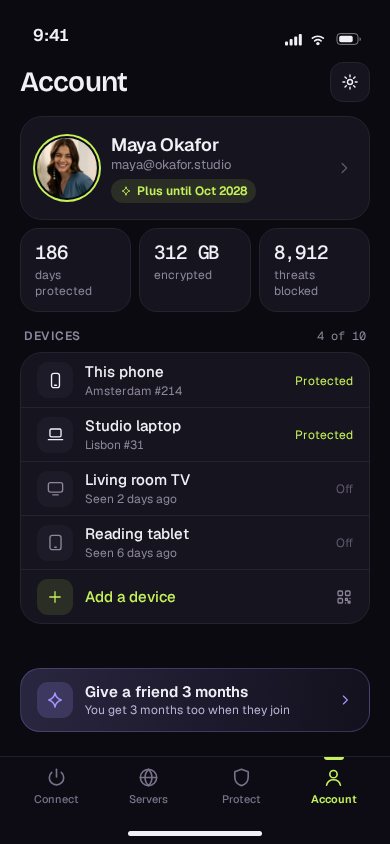
A profile screen from Tunnel, a VPN and online privacy app template in a Dark-first style. Screen 24 of 25.
Tunnel is a complete VPN and privacy app: welcome, sign in and VPN permission, a one tap connect home inside a glowing tunnel, the connecting handshake, a dot matrix server map, a country list and a country with its cities, live connection details, specialty servers and double hop, protocols, kill switch, split tunnelling, threat protection with a blocked log, a data breach monitor and a leak, a speed test, plans, checkout and a success screen, notifications, account and settings. Aubergine black and plum graphite with signal lime and lavender.
| Detail | Value |
|---|---|
| Screen type | Profile |
| App | Tunnel: VPN and online privacy |
| Category | Productivity |
| Design language | Dark-first, dark |
| Type | Bricolage Grotesque for headings, Geist for text |
| Colours | #0b0a11 background, #16141e surface, #f2f0f7 text, #8d879b text-muted, #c5f25a accent, #141a05 accent-contrast, #a796ff secondary, #26222f border, #ff6b5b danger |
What this screen says
- Account
- Maya Okaformaya@okafor.studio Plus until Oct 2028
- 186days protected
- 312 GBencrypted
- 8,912threats blocked
- Devices
- 4 of 10
- This phoneAmsterdam #214
- Protected
- Studio laptopLisbon #31
- Living room TVSeen 2 days ago
- Off
- Reading tabletSeen 6 days ago
- Add a device
- Give a friend 3 monthsYou get 3 months too when they join
- Connect
- Servers
- Protect
Around it in Tunnel
More profile screens
- Easel Profile: Collaborative whiteboard
- Token Profile: Two-factor codes and sign-in approvals
- Beam Profile: Send big files
- Parchment Profile: Documents, edit and share
- Lectern Profile: Slides and presenter remote
- Ringer My card: Phone, contacts and voicemail
- Pipeline Profile: Sales CRM on the road
- Aim Teammate: Goals and key results
- Scribe Profile: Voice memos to notes
- Inkline Profile: Sign and send contracts
- Dispatch Profile: Field service jobs for technicians
- Stash Profile: Read-it-later and highlights
Every productivity app profile screen
What makes a good profile screen
- Lead with identity. Photo, name and one line about the person at the top. It confirms whose profile this is.
- Show meaningful stats. Two to four numbers that matter in this app, like workouts, followers, books read or streak.
- Make editing obvious for the owner. An Edit profile button near the top, shown only on your own profile.
- Organise content with tabs. Posts, activity, saved or achievements as tabs keep a long profile tidy.
The full profile screen guide and every example
Remix Tunnel free: describe your own app and it is drawn in this design. Or get its files from $10: Figma, React Native, SwiftUI, Flutter and HTML.