Templates · List and feed screens · Productivity app · Inkwell
Inkwell Prompts screen
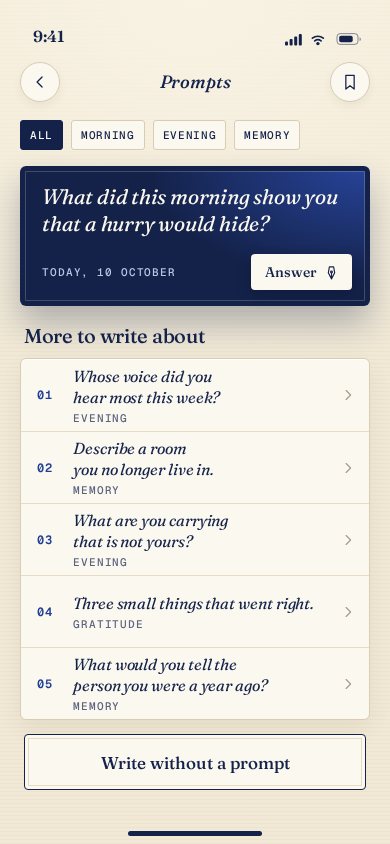
A list screen from Inkwell, a daily journal app template in a Luxury style. Screen 7 of 25.
Inkwell is a complete daily journal: welcome, sign in, a passcode lock and a daily reminder, today's page with a prompt, a ruled editor with photos, a mood drawn in ink, the saved entry, the whole journal as a timeline, a calendar of entries, search, tags, on this day, mood trends, a year in review, a printed volume to order, a Folio plan, notifications, profile and settings. Every date is a postmark and every page is paper.
| Detail | Value |
|---|---|
| Screen type | List |
| App | Inkwell: Daily journal |
| Category | Productivity |
| Design language | Luxury, light |
| Type | Fraunces |
| Colours | #f1e9d6 background, #fbf8ef surface, #14224a text, #5e6480 text-muted, #1f3d94 accent, #fbf8ef accent-contrast, #d9e0ee secondary, #d8cdb2 border, #a8392b danger |
What this screen says
- Prompts
- All Morning Evening Memory
- What did this morning show you that a hurry would hide?
- Today, 10 October Answer
- More to write about
- Whose voice did you hear most this week?
- Evening
- Describe a room you no longer live in.
- Memory
- What are you carrying that is not yours?
- Three small things that went right.
- Gratitude
- What would you tell the person you were a year ago?
- Write without a prompt
Around it in Inkwell
More list and feed screens
- Rota Notifications: Shift scheduling for hourly teams
- Shortlist Notifications: Job search and application tracker
- Parley Add members: Team messenger
- Docket Notifications: Task and sprint planner
- Kanso Notifications: Tasks, calendar and chat
- Margin Notebooks: AI note taking
- Aide Notifications: Executive AI assistant
- Juno Models: AI chat assistant
- Opal Projects: Studio dashboard
- Jot Folders: Quick notes and checklists
- Chrono Alarms: World clock, timers and stopwatch
- Frontdesk Views: Customer support inbox
Every productivity app list screen
What makes a good list screen
- Show what people need to decide. Each row should carry just enough to choose: a title, one or two details and a status. Everything else belongs on the detail screen.
- Keep rows consistent. The same information in the same place on every row lets people scan down a column instead of reading each item.
- Group with headings. Dates, categories or status headings break long lists into chunks people can skip through.
- Make common actions quick. Swipe actions, a checkbox or a heart on the row save opening the item for small tasks.
The full list screen guide and every example
Remix Inkwell free: describe your own app and it is drawn in this design. Or get its files from $10: Figma, React Native, SwiftUI, Flutter and HTML.