Templates · Live tracking screens · Productivity app · Canvas
Canvas Mirror screen
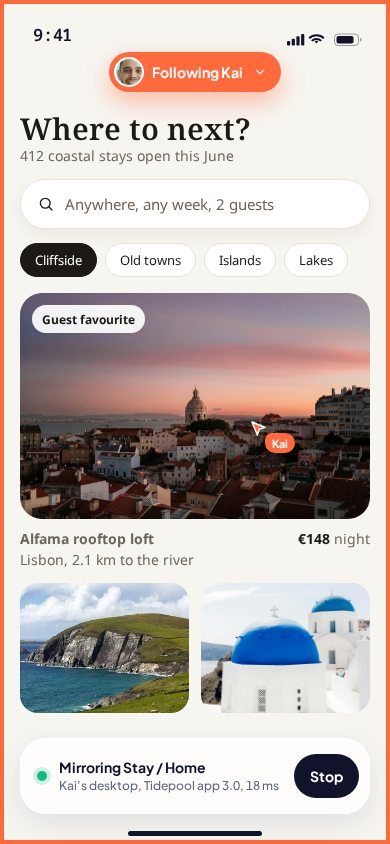
A tracking screen from Canvas, a productivity app template in a Glass style. Screen 11 of 25.
Canvas is a complete design file companion: welcome and sign in, recent files with who is editing live, search across files, frames and components, team projects, a file on a dotted canvas with multiplayer cursors, pages and layers, inspect with sizes, colours and code, a prototype player, live mirror that follows a teammate, comment threads with pins, mentions and resolve, sharing and permissions, version history, a whiteboard, a component library, team insights, activity, a plan upgrade with checkout and a confirmation, profile and settings. Frosted glass on an ice blue and lilac haze with ultramarine and a lime spark.
| Detail | Value |
|---|---|
| Screen type | Tracking |
| App | Canvas: Design files and comments on mobile |
| Category | Productivity |
| Design language | Glass, light |
| Type | Space Grotesk for headings, Plus Jakarta Sans for text |
| Colours | #eef1f8 background, #ffffff surface, #11132a text, #626780 text-muted, #3d3dff accent, #ffffff accent-contrast, #c6f24e secondary, #e2e5f1 border, #ff4d5e danger |
What this screen says
- Where to next?
- 412 coastal stays open this June
- Anywhere, any week, 2 guests
- Cliffside Old towns Islands Lakes
- Guest favourite
- Alfama rooftop loft€148 night
- Lisbon, 2.1 km to the river
- Following Kai
- Kai
- Mirroring Stay / HomeKai’s desktop, Tidepool app 3.0, 18 ms
- Stop
Around it in Canvas
More live tracking screens
- Tunnel Connecting: VPN and online privacy
- Ping Testing: Internet speed test
- Easel Voting: Collaborative whiteboard
- Beam Uploading: Send big files
- Lectern Rehearse: Slides and presenter remote
- Ringer In call: Phone, contacts and voicemail
- Pipeline Route: Sales CRM on the road
- Aim Focus: Goals and key results
- Scribe Transcribing: Voice memos to notes
- Inkline Live status: Sign and send contracts
- Dispatch Route: Field service jobs for technicians
- Uptime Regions: Server and site monitoring
Every productivity app tracking screen
What makes a good live tracking screen
- The live number is the hero. Arrival time, pace, distance or time left, in large type at the top or centre.
- Show status in words. "Driver is 3 minutes away" or "Halfway there" alongside the map or chart.
- Make it readable while moving. Large numbers, high contrast and big buttons for pause, stop or call.
- Keep updates calm. Smooth movement on the map and steady numbers; jumpy updates feel broken.
The full live tracking screen guide and every example
Remix Canvas free: describe your own app and it is drawn in this design. Or get its files from $10: Figma, React Native, SwiftUI, Flutter and HTML.