Templates · Booking and checkout screens · Productivity app · Chrono
Chrono Send invite screen
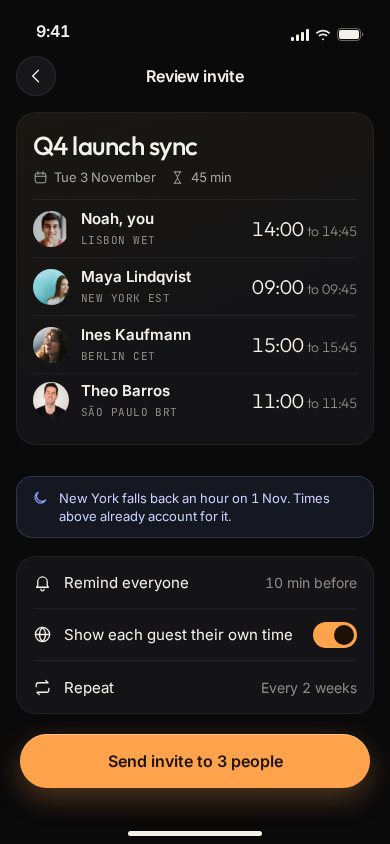
A checkout screen from Chrono, a productivity app template in a Dark-first style. Screen 8 of 25.
Chrono is a complete clock app: welcome, picking your cities, sign in, a world clock with a live dial and a daylight band for every city, city search and a city page with its sun arc, a meeting planner across zones with an invite and confirmation, alarms with an editor and a ringing screen, bedtime, a stopwatch with laps and lap splits, timers with presets, a new timer and a running ring, focus sessions, insights, widgets, notifications, a Pro plan, profile and settings. Obsidian black with sodium amber for day and periwinkle for night.
| Detail | Value |
|---|---|
| Screen type | Checkout |
| App | Chrono: World clock, timers and stopwatch |
| Category | Productivity |
| Design language | Dark-first, dark |
| Type | Outfit for headings, Inter for text |
| Colours | #0a0a0b background, #141416 surface, #f4f1ea text, #8f8c86 text-muted, #ffa24c accent, #1c1105 accent-contrast, #8fa2ff secondary, #242427 border, #ff6250 danger |
What this screen says
- Review invite
- Q4 launch sync
- Tue 3 November 45 min
- Noah, youLISBON WET
- 14:00 to 14:45
- Maya LindqvistNEW YORK EST
- 09:00 to 09:45
- Ines KaufmannBERLIN CET
- 15:00 to 15:45
- Theo BarrosSÃO PAULO BRT
- 11:00 to 11:45
- New York falls back an hour on 1 Nov. Times above already account for it.
- Remind everyone 10 min before
- Show each guest their own time
- Repeat Every 2 weeks
- Send invite to 3 people
Around it in Chrono
More booking and checkout screens
- Shipyard Upgrade: Issue tracking for product teams
- Canvas Checkout: Design files and comments on mobile
- Merge: Code, pull requests and reviews
- Query Checkout: AI answers with sources
- Glossa Checkout: Translate text, voice and camera
- Layout Download: Design anything from templates
- Tick Checkout: To-do lists and reminders
- Beacon Confirm lost mode: Find your devices and people
- Staffroom Review request: HR, payslips and time off
- Slot Pick a day: Booking links and meeting scheduling
- Tunnel Checkout: VPN and online privacy
- Ping Checkout: Internet speed test
Every productivity app checkout screen
What makes a good checkout screen
- Show the total early and honestly. Taxes, delivery and service fees should appear before the last step. A higher total on the final screen feels like a trick.
- Offer wallet payments. Apple Pay and Google Pay skip card typing entirely. Show them first when they are available.
- Ask for the minimum. Only the fields needed to deliver or book. Save details for next time.
- Let people review before paying. A clear summary of items, dates, address and price, with each part editable without starting over.
The full checkout screen guide and every example
Remix Chrono free: describe your own app and it is drawn in this design. Or get its files from $10: Figma, React Native, SwiftUI, Flutter and HTML.