Templates · Profile screens · Productivity app · Inkline
Inkline Profile screen
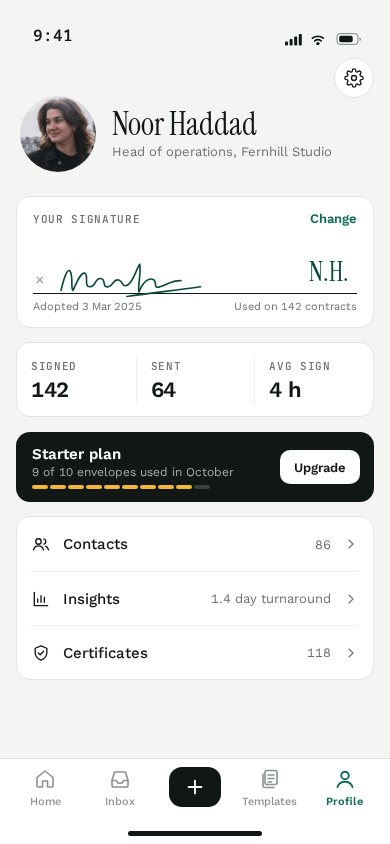
A profile screen from Inkline, a sign and send contracts app template in a Clinical style. Screen 24 of 25.
Inkline is a complete contract signing app: welcome, sign in, adopting a signature, a home with what needs your signature, an inbox of envelopes, an envelope with its signer chain, a document viewer with sign here flags, a signature pad, finish and signed, then sending your own: upload, recipients and signing order, placing fields on the page, review and sent, live status as a signer reads, the audit trail certificate, templates, search, contacts, turnaround insights, plans, notifications, profile and settings. Paper white and hairlines with deep viridian ink and amber flags.
| Detail | Value |
|---|---|
| Screen type | Profile |
| App | Inkline: Sign and send contracts |
| Category | Productivity |
| Design language | Clinical, light |
| Type | Instrument Serif for headings, Work Sans for text |
| Colours | #f4f5f2 background, #ffffff surface, #111714 text, #69726d text-muted, #0d6b57 accent, #e3f0eb accent-soft, #f5b638 secondary, #e2e5e0 border, #b23a2e danger |
What this screen says
- Noor Haddad
- Head of operations, Fernhill Studio
- Your signature
- Change
- N.H.
- Adopted 3 Mar 2025 Used on 142 contracts
- Signed 142
- Sent 64
- Avg sign 4 h
- Starter plan
- 9 of 10 envelopes used in October
- Upgrade
- Contacts 86
- Insights 1.4 day turnaround
- Certificates 118
- Home
- Inbox
- Templates
- Profile
Around it in Inkline
More profile screens
- Shortlist Profile: Job search and application tracker
- Parley Profile: Team messenger
- Docket Teammate: Task and sprint planner
- Kanso Profile: Tasks, calendar and chat
- Margin Profile: AI note taking
- Aide Profile: Executive AI assistant
- Juno Profile: AI chat assistant
- Opal Profile: Studio dashboard
- Jot Profile: Quick notes and checklists
- Chrono Profile: World clock, timers and stopwatch
- Frontdesk Customer: Customer support inbox
- Campaign Contact: Email marketing campaigns
Every productivity app profile screen
What makes a good profile screen
- Lead with identity. Photo, name and one line about the person at the top. It confirms whose profile this is.
- Show meaningful stats. Two to four numbers that matter in this app, like workouts, followers, books read or streak.
- Make editing obvious for the owner. An Edit profile button near the top, shown only on your own profile.
- Organise content with tabs. Posts, activity, saved or achievements as tabs keep a long profile tidy.
The full profile screen guide and every example
Remix Inkline free: describe your own app and it is drawn in this design. Or get its files from $10: Figma, React Native, SwiftUI, Flutter and HTML.