Templates · Onboarding screens · Lifestyle app · Trove
Trove Interests screen
An onboarding screen from Trove, a visual ideas and boards app template in a Minimal style. Screen 2 of 25.
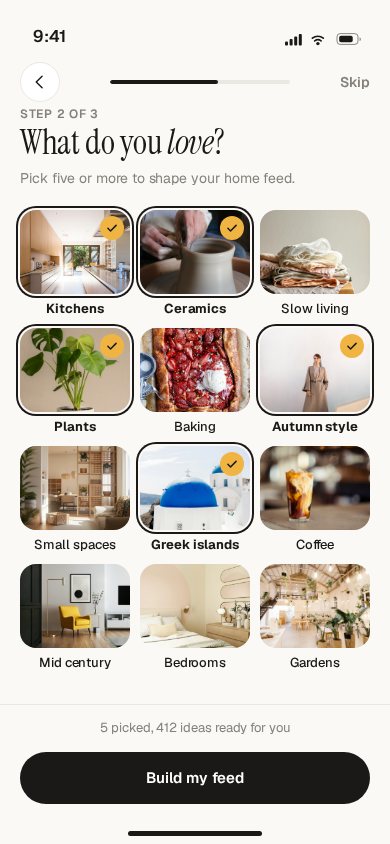
Trove is a complete visual discovery app: welcome, picking interests, sign in, a masonry home feed, search with idea categories, results with filters, an idea in full, saving to a board, your boards, a board with sections and collaborators, creating a board and posting an idea, a camera lens that finds similar ideas, shop the look with checkout and an order confirmation, creator analytics, messages, a shared idea chat, updates, your profile, a creator profile, a Plus plan and settings. Paper white and ink with one gilt amber accent.
| Detail | Value |
|---|---|
| Screen type | Onboarding |
| App | Trove: Visual ideas and boards |
| Category | Lifestyle |
| Design language | Minimal, light |
| Type | Instrument Serif for headings, Geist for text |
| Colours | #faf9f6 background, #ffffff surface, #1a1917 text, #85817a text-muted, #f0b443 accent, #a86f12 accent-contrast, #f1efea secondary, #ebe8e2 border, #d6453d danger |
What this screen says
- Skip
- Step 2 of 3
- What do you love?
- Pick five or more to shape your home feed.
- Kitchens
- Ceramics
- Slow living
- Plants
- Baking
- Autumn style
- Small spaces
- Greek islands
- Coffee
- Mid century
- Bedrooms
- Gardens
- 5 picked, 412 ideas ready for you
- Build my feed
Around it in Trove
More onboarding screens
- Laced Welcome: Sneaker drops and raffles
- Gloss Welcome: Salon and spa booking
- Vow Welcome: Wedding planner
- Drizzle Welcome: Weather with living skies
- Byline Welcome: Daily news reader
- Shelf Welcome: Reading tracker and book club
- Marquee Welcome: Cinema tickets and watchlist
- Handy Welcome: Home services
- Tasker Welcome: Book and do local odd jobs
- Toolbox Welcome: Hardware store and project lists
- Brief Welcome: News in sixty words
- Kibble Welcome: Pet supplies and autoship
Every lifestyle app onboarding screen
What makes a good onboarding screen
- One idea per screen. Each screen should say one thing in a headline people can read in a second. If a screen needs a paragraph, it is doing too much.
- Personalise with a purpose. Ask a question only if the answer changes what people see next, like a goal, a level or an interest. Then show that the answer mattered.
- Explain permissions before asking. Show your own screen saying why you need notifications, location or the camera before the system prompt. People who understand the reason are more likely to allow it.
- Let people skip. A visible skip or "I'll do this later" respects returning users and the impatient. Make sure skipping still lands them somewhere useful.
The full onboarding screen guide and every example
Remix Trove free: describe your own app and it is drawn in this design. Or get its files from $10: Figma, React Native, SwiftUI, Flutter and HTML.