Templates · Form and input screens · Lifestyle app · Trove
Trove Create screen
A form screen from Trove, a visual ideas and boards app template in a Minimal style. Screen 12 of 25.
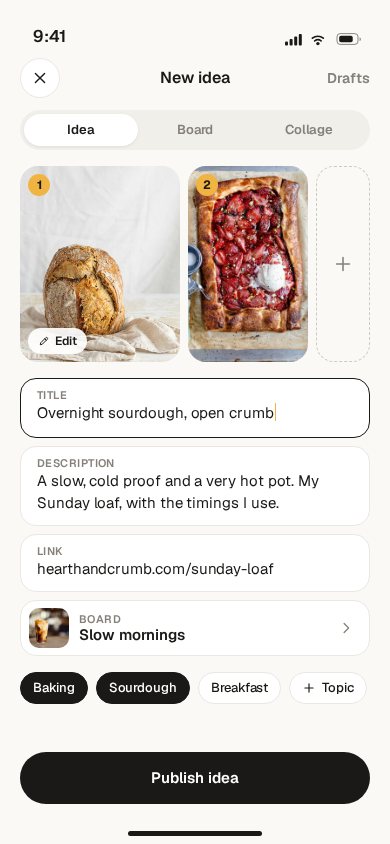
Trove is a complete visual discovery app: welcome, picking interests, sign in, a masonry home feed, search with idea categories, results with filters, an idea in full, saving to a board, your boards, a board with sections and collaborators, creating a board and posting an idea, a camera lens that finds similar ideas, shop the look with checkout and an order confirmation, creator analytics, messages, a shared idea chat, updates, your profile, a creator profile, a Plus plan and settings. Paper white and ink with one gilt amber accent.
| Detail | Value |
|---|---|
| Screen type | Form |
| App | Trove: Visual ideas and boards |
| Category | Lifestyle |
| Design language | Minimal, light |
| Type | Instrument Serif for headings, Geist for text |
| Colours | #faf9f6 background, #ffffff surface, #1a1917 text, #85817a text-muted, #f0b443 accent, #a86f12 accent-contrast, #f1efea secondary, #ebe8e2 border, #d6453d danger |
What this screen says
- New idea
- Drafts
- Idea Board Collage
- 1 Edit
- Title
- Overnight sourdough, open crumb
- Description
- A slow, cold proof and a very hot pot. My Sunday loaf, with the timings I use.
- Link
- hearthandcrumb.com/sunday-loaf
- BoardSlow mornings
- Baking Sourdough Breakfast Topic
- Publish idea
Around it in Trove
More form and input screens
- Bazaar Make offer: Local buy and sell
- Kiln Filters: Handmade marketplace
- Drape Sizes and fit: AI wardrobe and daily outfits
- Mane Hair profile: AI hairstyle try-on
- Annex Room type: AI interior redesign
- Kino Rate: Film and series streaming
- Stitch Add yarn: A knitting companion drawn as one big knitting chart
- Roost Add item: Your shared house, stuck to the fridge door
- Grain Export: Camera and photo editor
- Posy Build a bouquet: Flower delivery and weekly stems
- Fern Log watering: Plant care
- Doorstep Filters: Homes for sale and rent
Every lifestyle app form screen
What makes a good form screen
- Ask only what you need. Every field is a reason to stop. Remove optional fields or move them to later.
- Labels above fields. Visible labels stay readable while people type; placeholder-only labels disappear.
- Use the right keyboard and input. Number pads for amounts, email keyboards for email, pickers for dates and autofill for addresses and codes.
- Validate as people go. Show problems next to the field when people leave it, in words that say how to fix them.
The full form screen guide and every example
Remix Trove free: describe your own app and it is drawn in this design. Or get its files from $10: Figma, React Native, SwiftUI, Flutter and HTML.