Templates · Success and confirmation screens · Lifestyle app · Trove
Trove Posted screen
A success screen from Trove, a visual ideas and boards app template in a Minimal style. Screen 13 of 25.
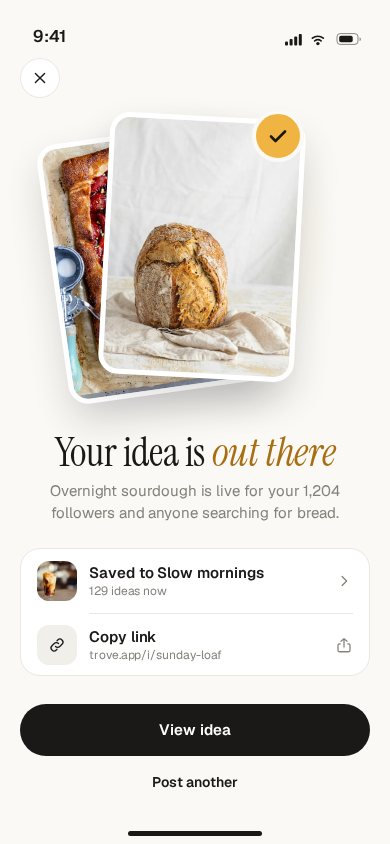
Trove is a complete visual discovery app: welcome, picking interests, sign in, a masonry home feed, search with idea categories, results with filters, an idea in full, saving to a board, your boards, a board with sections and collaborators, creating a board and posting an idea, a camera lens that finds similar ideas, shop the look with checkout and an order confirmation, creator analytics, messages, a shared idea chat, updates, your profile, a creator profile, a Plus plan and settings. Paper white and ink with one gilt amber accent.
| Detail | Value |
|---|---|
| Screen type | Success |
| App | Trove: Visual ideas and boards |
| Category | Lifestyle |
| Design language | Minimal, light |
| Type | Instrument Serif for headings, Geist for text |
| Colours | #faf9f6 background, #ffffff surface, #1a1917 text, #85817a text-muted, #f0b443 accent, #a86f12 accent-contrast, #f1efea secondary, #ebe8e2 border, #d6453d danger |
What this screen says
- Your idea is out there
- Overnight sourdough is live for your 1,204 followers and anyone searching for bread.
- Saved to Slow mornings129 ideas now
- Copy linktrove.app/i/sunday-loaf
- View idea
- Post another
Around it in Trove
More success and confirmation screens
- Hem Booked: Tailoring and alterations, collected
- Lendly Request sent: Borrow things from neighbours
- Stub Bought: Fan to fan ticket resale
- Vidi Published: Video platform for creators
- Roll Order placed: Photo library and backups
- Splice Saved: Video editor for short clips
- Blush Order placed: Beauty and makeup shopping
- Flatpack Order confirmed: Furniture store with room previews
- Column Subscribed: Newsletters and independent writers
- Fetch Booked: Dog walkers and pet sitters
- Forecourt Reserved: Buy and sell used cars
- Tower All set: Mobile plan, data and bills
Every lifestyle app success screen
What makes a good confirmation screen
- Confirm in the headline. "Payment sent", "Table booked for Friday at 8" or "Lesson complete" in plain words, with a clear success colour or icon.
- Repeat the key details. Amount, date, reference number or score, so people do not need to check elsewhere that the right thing happened.
- Say what happens next. When the order arrives, when the money lands, when the next lesson unlocks.
- Offer the next step. Track the order, add to calendar, share, or start the next lesson. One primary action and a way back home.
The full confirmation screen guide and every example
Remix Trove free: describe your own app and it is drawn in this design. Or get its files from $10: Figma, React Native, SwiftUI, Flutter and HTML.