Templates · Profile screens · Lifestyle app · Trellis
Trellis Profile screen
A profile screen from Trellis, a vegetable garden planner app template in a Minimal style. Screen 24 of 25.
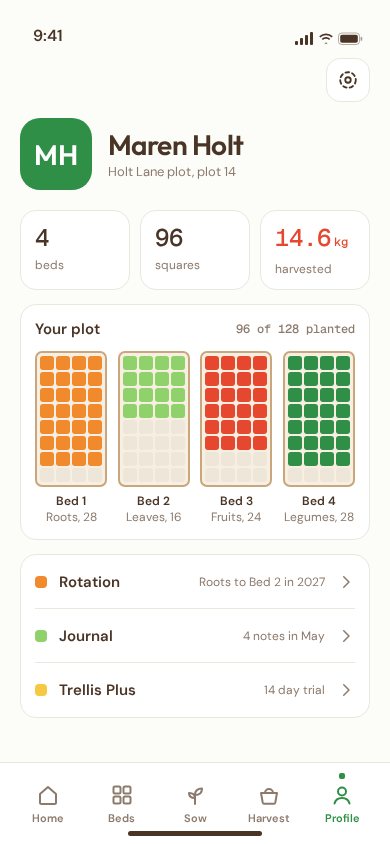
Trellis is trellis plans a vegetable plot square by square. It covers laying out beds, what to sow this week, a sowing calendar, watering and rain, the harvest log with weights, crop rotation across four bed groups and the season between frost dates.
| Detail | Value |
|---|---|
| Screen type | Profile |
| App | Trellis: Vegetable garden planner |
| Category | Lifestyle |
| Design language | Minimal, light |
| Type | DM Sans |
| Colours | #fcfdf9 background, #ffffff surface, #4a3426 text, #8c7a6c text-muted, #2f8f46 accent, #ffffff accent-contrast, #f6c945 secondary, #e6eadc border, #e5482f danger |
What this screen says
- MH
- Maren Holt
- Holt Lane plot, plot 14
- 4beds
- 96squares
- 14.6kgharvested
- Your plot96 of 128 planted
- Bed 1Roots, 28
- Bed 2Leaves, 16
- Bed 3Fruits, 24
- Bed 4Legumes, 28
- RotationRoots to Bed 2 in 2027
- Journal4 notes in May
- Trellis Plus14 day trial
- Home
- Beds
- Sow
- Harvest
- Profile
Around it in Trellis
More profile screens
- Drape Profile: AI wardrobe and daily outfits
- Annex Profile: AI interior redesign
- Kino Who is watching: Film and series streaming
- Waybill Profile: Every parcel, read like its label
- Torque Profile: The workshop manual for your own car
- Vetly Profile: Pet health record
- Stitch Profile: A knitting companion drawn as one big knitting chart
- Roost Profile: Your shared house, stuck to the fridge door
- Grain Photographer: Camera and photo editor
- Posy Profile: Flower delivery and weekly stems
- Fern Profile: Plant care
- Doorstep Agent: Homes for sale and rent
Every lifestyle app profile screen
What makes a good profile screen
- Lead with identity. Photo, name and one line about the person at the top. It confirms whose profile this is.
- Show meaningful stats. Two to four numbers that matter in this app, like workouts, followers, books read or streak.
- Make editing obvious for the owner. An Edit profile button near the top, shown only on your own profile.
- Organise content with tabs. Posts, activity, saved or achievements as tabs keep a long profile tidy.
The full profile screen guide and every example
Remix Trellis free: describe your own app and it is drawn in this design. Or get its files from $10: Figma, React Native, SwiftUI, Flutter and HTML.