Templates · Profile screens · Lifestyle app · Roost
Roost Profile screen
A profile screen from Roost, a lifestyle app template in a Gen Z style. Screen 24 of 25.
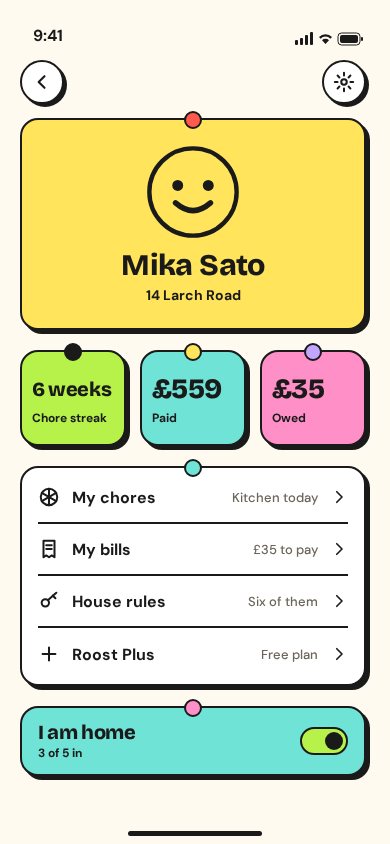
Roost is roost runs a shared house end to end: a chore rota on a segmented wheel, a shared shopping list with struck through items, bills split into bars per housemate and a settle up flow. It also covers a row of doors showing who is home, a noticeboard of notes, house rules, housemate profiles, notifications and a Roost Plus plan.
| Detail | Value |
|---|---|
| Screen type | Profile |
| App | Roost: Your shared house, stuck to the fridge door |
| Category | Lifestyle |
| Design language | Gen Z, light |
| Type | DM Sans |
| Colours | #fffaf0 background, #ffffff surface, #1a1a1a text, #6b655a text-muted, #ffe45c accent, #1a1a1a accent-contrast, #ff8fc7 secondary, #1a1a1a border, #ff5a4d danger |
What this screen says
- Mika Sato
- 14 Larch Road
- 6 weeks
- Chore streak
- Paid
- Owed
- My chores Kitchen today
- My bills £35 to pay
- House rules Six of them
- Roost Plus Free plan
- I am home
- 3 of 5 in
Around it in Roost
More profile screens
- Shelf Profile: Reading tracker and book club
- Marquee Profile: Cinema tickets and watchlist
- Handy Pro profile: Home services
- Tasker: Book and do local odd jobs
- Toolbox Profile: Hardware store and project lists
- Brief Profile: News in sixty words
- Kibble Pet profile: Pet supplies and autoship
- Filmlog Profile: Film diary and reviews
- Guardrail Profile: Parental controls and screen time
- Collar Pet profile: GPS pet tracker
- Postage Account: Send parcels and find drop-off points
- Specs Profile: Glasses with virtual try-on
Every lifestyle app profile screen
What makes a good profile screen
- Lead with identity. Photo, name and one line about the person at the top. It confirms whose profile this is.
- Show meaningful stats. Two to four numbers that matter in this app, like workouts, followers, books read or streak.
- Make editing obvious for the owner. An Edit profile button near the top, shown only on your own profile.
- Organise content with tabs. Posts, activity, saved or achievements as tabs keep a long profile tidy.
The full profile screen guide and every example
Remix Roost free: describe your own app and it is drawn in this design. Or get its files from $10: Figma, React Native, SwiftUI, Flutter and HTML.