Templates · Profile screens · Lifestyle app · Waybill
Waybill Profile screen
A profile screen from Waybill, a lifestyle app template in a Clinical style. Screen 24 of 25.
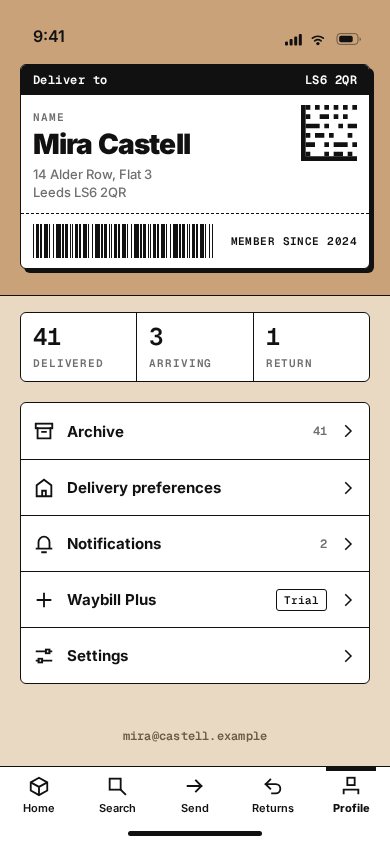
Waybill is waybill gathers every delivery from every shop into one list with live status, a full journey timeline and a courier map. It also covers returns, customs duties, delivery preferences and sending a parcel of your own, from size and courier comparison to a printed label.
| Detail | Value |
|---|---|
| Screen type | Profile |
| App | Waybill: Every parcel, read like its label |
| Category | Lifestyle |
| Design language | Clinical, light |
| Type | Inter |
| Colours | #ead9c2 background, #ffffff surface, #111111 text, #6b5a47 text-muted, #111111 accent, #ffffff accent-contrast, #c9a27a secondary, #111111 border, #e5322d danger |
What this screen says
- Deliver to LS6 2QR
- NAME
- Mira Castell
- 14 Alder Row, Flat 3
- Leeds LS6 2QR
- MEMBER SINCE 2024
- 41DELIVERED
- 3ARRIVING
- 1RETURN
- Archive 41
- Delivery preferences
- Notifications 2
- Waybill Plus Trial
- Settings
- mira@castell.example
- Home
- Search
- Send
- Returns
- Profile
Around it in Waybill
More profile screens
- Tasker: Book and do local odd jobs
- Toolbox Profile: Hardware store and project lists
- Brief Profile: News in sixty words
- Kibble Pet profile: Pet supplies and autoship
- Filmlog Profile: Film diary and reviews
- Guardrail Profile: Parental controls and screen time
- Collar Pet profile: GPS pet tracker
- Postage Account: Send parcels and find drop-off points
- Specs Profile: Glasses with virtual try-on
- Circuit Account: Electronics store with trade-in and repairs
- Provenance Account: Authenticated luxury resale
- Gavel Profile: Live online auctions
Every lifestyle app profile screen
What makes a good profile screen
- Lead with identity. Photo, name and one line about the person at the top. It confirms whose profile this is.
- Show meaningful stats. Two to four numbers that matter in this app, like workouts, followers, books read or streak.
- Make editing obvious for the owner. An Edit profile button near the top, shown only on your own profile.
- Organise content with tabs. Posts, activity, saved or achievements as tabs keep a long profile tidy.
The full profile screen guide and every example
Remix Waybill free: describe your own app and it is drawn in this design. Or get its files from $10: Figma, React Native, SwiftUI, Flutter and HTML.