Templates · List and feed screens · Finance app · Ticker
Ticker Movers screen
A list screen from Ticker, a stock investing app template in a Dark-first style. Screen 8 of 25.
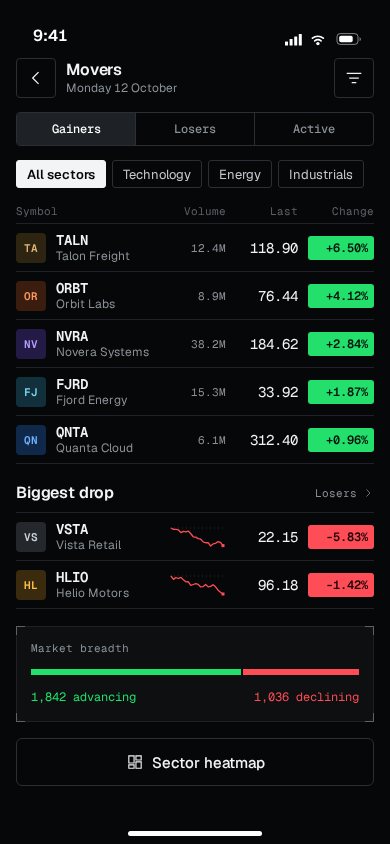
Ticker is a complete stock investing app: welcome, sign in, account creation and a passcode, a home with portfolio value and a dense watchlist, search, markets with indices and a sector heatmap, movers, a stock page with candles and key stats, a full chart, an order ticket with a keypad, review and confirmation, orders, portfolio and holdings, news and a story, an earnings calendar, price alerts, adding funds, a Pro plan, notifications, account and settings. Green means up or buy and red means down or sell, nowhere else.
| Detail | Value |
|---|---|
| Screen type | List |
| App | Ticker: Stock investing |
| Category | Finance |
| Design language | Dark-first, dark |
| Type | Geist |
| Colours | #060708 background, #0d0f11 surface, #f2f4f5 text, #8a9299 text-muted, #22e06b accent, #03140a accent-contrast, #ffb224 secondary, #1e2226 border, #ff4d57 danger |
What this screen says
- Movers
- Monday 12 October
- Gainers Losers Active
- All sectors Technology Energy Industrials
- Symbol Volume Last Change
- TA
- TALN
- Talon Freight
- 12.4M 118.90 +6.50%
- OR
- ORBT
- Orbit Labs
- 8.9M 76.44 +4.12%
- NV
- NVRA
- Novera Systems
- 38.2M 184.62 +2.84%
- FJ
- FJRD
- Fjord Energy
- 15.3M 33.92 +1.87%
- QN
- QNTA
- Quanta Cloud
- 6.1M 312.40 +0.96%
- Biggest drop
- Losers
- VS
- VSTA
- Vista Retail
Around it in Ticker
More list and feed screens
- Roundup Round ups: Invest your spare change
- Envelope Quick assign: Give every dollar a job
- Recur Subscriptions: Track and cancel subscriptions
- Keel Cards: Corporate cards and spend controls
- Giftly Wallet: Gift cards, sent and stored
- Zap Activity: Pay friends with a note
- Billfold Transactions: Cards, passes and tickets wallet
- Payly Plans: UPI payments, recharges and bills
- Crest Cards: Credit card bills and rewards
- Storefront Orders: Run your online store
- Bastion Pay and transfer: Everyday banking from a big bank
- Later Payments: Buy now, pay in four
What makes a good list screen
- Show what people need to decide. Each row should carry just enough to choose: a title, one or two details and a status. Everything else belongs on the detail screen.
- Keep rows consistent. The same information in the same place on every row lets people scan down a column instead of reading each item.
- Group with headings. Dates, categories or status headings break long lists into chunks people can skip through.
- Make common actions quick. Swipe actions, a checkbox or a heart on the row save opening the item for small tasks.
The full list screen guide and every example
Remix Ticker free: describe your own app and it is drawn in this design. Or get its files from $10: Figma, React Native, SwiftUI, Flutter and HTML.