Templates · List and feed screens · Finance app · Later
Later Payments screen
A list screen from Later, a finance app template in a Playful style. Screen 12 of 25.
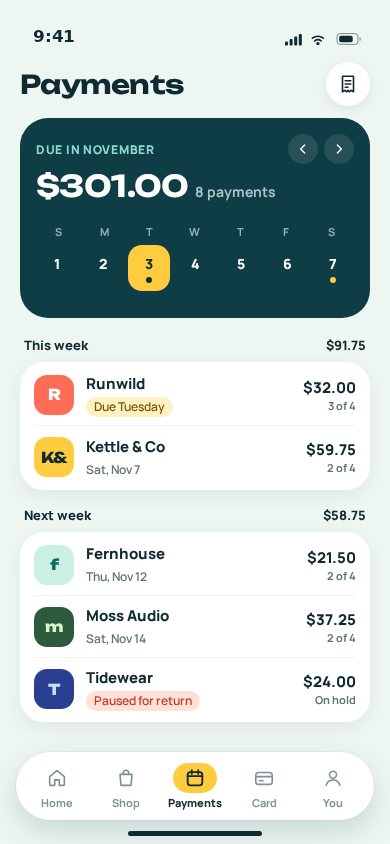
Later is a complete pay in four shopping app: welcome, how it works, sign in and a code, a home with the next payment and spending limit, a shop directory, search, a store, a product, a checkout that shows all four payments, approval, a payments calendar, purchase details, paying early, a return that pauses payments, purchases, spending limit, monthly spending, a one-time card, deals, a plus plan, notifications, profile and settings. Pale mint and white with deep sea teal, turquoise, sunflower and a coral for what is due.
| Detail | Value |
|---|---|
| Screen type | List |
| App | Later: Buy now, pay in four |
| Category | Finance |
| Design language | Playful, light |
| Type | Unbounded for headings, Manrope for text |
| Colours | #eef6f2 background, #ffffff surface, #0f2a30 text, #5f7479 text-muted, #0f3d46 primary, #19c3ad accent, #ffcc3f secondary, #dbe8e3 border, #ff6d57 danger |
What this screen says
- Payments
- Due in November
- $301.008 payments
- S M T W T F S
- This week $91.75
- RunwildDue Tuesday
- $32.003 of 4
- K&
- Kettle & CoSat, Nov 7
- $59.752 of 4
- Next week $58.75
- FernhouseThu, Nov 12
- $21.502 of 4
- Moss AudioSat, Nov 14
- $37.252 of 4
- TidewearPaused for return
- $24.00On hold
- Home
- Shop
- Card
- You
Around it in Later
More list and feed screens
- Divvy Notifications: Split bills with friends
- Ticker Movers: Stock investing
- Burrow Notifications: Shared savings pots
- Remit Notifications: International money transfer
- Piggy Chores: Pocket money for kids
- Settle Notifications: Bill payments and banking
- Fathom Notifications: Crypto wallet
- Marigold Notifications: Mobile banking
- Zentra Activity: Crypto trading
- Payday Pay runs: Payroll for small teams
- Roundup Round ups: Invest your spare change
- Envelope Quick assign: Give every dollar a job
What makes a good list screen
- Show what people need to decide. Each row should carry just enough to choose: a title, one or two details and a status. Everything else belongs on the detail screen.
- Keep rows consistent. The same information in the same place on every row lets people scan down a column instead of reading each item.
- Group with headings. Dates, categories or status headings break long lists into chunks people can skip through.
- Make common actions quick. Swipe actions, a checkbox or a heart on the row save opening the item for small tasks.
The full list screen guide and every example
Remix Later free: describe your own app and it is drawn in this design. Or get its files from $10: Figma, React Native, SwiftUI, Flutter and HTML.