Templates · List and feed screens · Finance app · Crest
Crest Cards screen
A list screen from Crest, a credit card bills and rewards app template in a Luxury style. Screen 5 of 25.
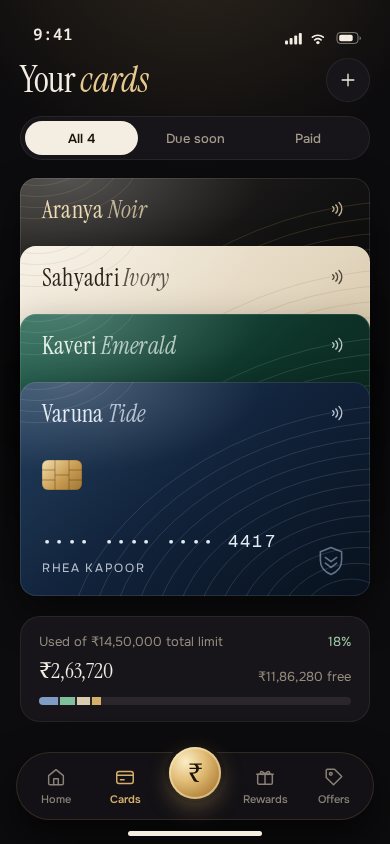
Crest is a complete credit card bill app: welcome, mobile sign in and code, a home with the total due across four cards and the next bills, a wallet of cards, card details, adding a card, statements, transactions, paying a bill with total, minimum or custom amounts, choosing how to pay and a paid receipt with coins earned, due dates on a calendar, autopay, spend analysis, credit score, a coins wallet, member offers with a stay you can claim and book, notifications, a Reserve membership, profile and settings. Onyx and champagne gold with ivory serif numbers.
| Detail | Value |
|---|---|
| Screen type | List |
| App | Crest: Credit card bills and rewards |
| Category | Finance |
| Design language | Luxury, dark |
| Type | Instrument Serif for headings, Onest for text |
| Colours | #0c0b0d background, #17151a surface, #f3ede2 text, #948b7e text-muted, #d4b06a accent, #1a1408 accent-contrast, #9cc7a4 secondary, #2a262c border, #e8846f danger |
What this screen says
- Your cards
- All 4 Due soon Paid
- Aranya Noir
- •••• •••• •••• 7762
- Rhea Kapoor
- Sahyadri Ivory
- •••• •••• •••• 3308
- Kaveri Emerald
- •••• •••• •••• 9021
- Varuna Tide
- •••• •••• •••• 4417
- Used of ₹14,50,000 total limit 18%
- ₹2,63,720₹11,86,280 free
- Home
- Cards
- Rewards
- Offers
Around it in Crest
More list and feed screens
- Keel Cards: Corporate cards and spend controls
- Giftly Wallet: Gift cards, sent and stored
- Zap Activity: Pay friends with a note
- Billfold Transactions: Cards, passes and tickets wallet
- Payly Plans: UPI payments, recharges and bills
- Storefront Orders: Run your online store
- Bastion Pay and transfer: Everyday banking from a big bank
- Later Payments: Buy now, pay in four
- Standing Report: Credit score and reports
- Accrue Pots: Retirement and pension planner
- Levy Income: Taxes for freelancers
- Bullion Holdings: Gold and silver savings
What makes a good list screen
- Show what people need to decide. Each row should carry just enough to choose: a title, one or two details and a status. Everything else belongs on the detail screen.
- Keep rows consistent. The same information in the same place on every row lets people scan down a column instead of reading each item.
- Group with headings. Dates, categories or status headings break long lists into chunks people can skip through.
- Make common actions quick. Swipe actions, a checkbox or a heart on the row save opening the item for small tasks.
The full list screen guide and every example
Remix Crest free: describe your own app and it is drawn in this design. Or get its files from $10: Figma, React Native, SwiftUI, Flutter and HTML.