Templates · List and feed screens · Finance app · Bastion
Bastion Pay and transfer screen
A list screen from Bastion, a finance app template in an Enterprise style. Screen 9 of 25.
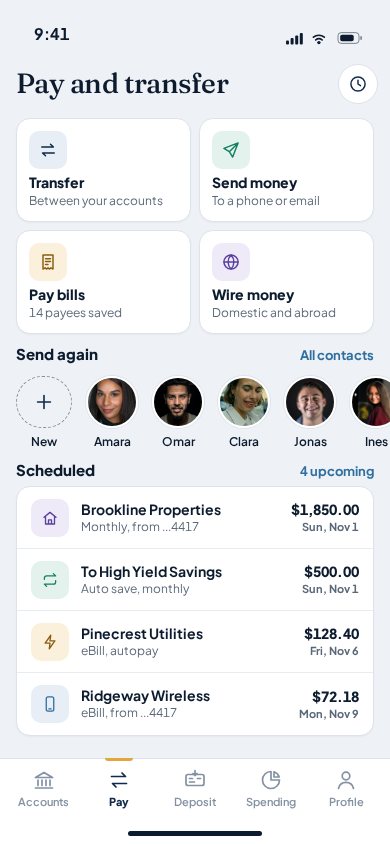
Bastion is a complete big bank app: welcome, sign in, a one time code, an accounts overview, checking, savings and credit card pages, a transaction, the pay and transfer hub, a transfer with review and confirmation, send to a phone or email, bill pay, check deposit with a capture camera, card controls, spending insights, statements, a branch and ATM finder, alerts, secure messages, the Citadel premium tier, profile and settings. Cool grey and white with harbour navy, rampart gold and a quiet green for money in.
| Detail | Value |
|---|---|
| Screen type | List |
| App | Bastion: Everyday banking from a big bank |
| Category | Finance |
| Design language | Enterprise, light |
| Type | Fraunces for headings, Plus Jakarta Sans for text |
| Colours | #eef1f5 background, #ffffff surface, #0c1b2e text, #5b6879 text-muted, #0f2a4a primary, #e3a63c accent, #13805f success, #2f6f9f secondary, #dde3ea border, #c2412d danger |
What this screen says
- Pay and transfer
- Transfer
- Between your accounts
- Send money
- To a phone or email
- Pay bills
- 14 payees saved
- Wire money
- Domestic and abroad
- Send againAll contacts
- New
- Amara
- Omar
- Clara
- Jonas
- Ines
- Scheduled4 upcoming
- Brookline Properties
- Monthly, from ...4417
- $1,850.00Sun, Nov 1
- To High Yield Savings
- Auto save, monthly
- $500.00Sun, Nov 1
- Pinecrest Utilities
- eBill, autopay
- $128.40Fri, Nov 6
- Ridgeway Wireless
- eBill, from ...4417
- $72.18Mon, Nov 9
- Accounts
Around it in Bastion
More list and feed screens
- Billable Today: Time tracking and invoices, kept like a ledger
- Lease Receipts: Your tenancy, drawn to plan
- Claim Expenses: Expenses, filed like a till receipt
- Tally Notifications: Monthly budgeting
- Divvy Notifications: Split bills with friends
- Ticker Movers: Stock investing
- Burrow Notifications: Shared savings pots
- Remit Notifications: International money transfer
- Piggy Chores: Pocket money for kids
- Settle Notifications: Bill payments and banking
- Fathom Notifications: Crypto wallet
- Marigold Notifications: Mobile banking
What makes a good list screen
- Show what people need to decide. Each row should carry just enough to choose: a title, one or two details and a status. Everything else belongs on the detail screen.
- Keep rows consistent. The same information in the same place on every row lets people scan down a column instead of reading each item.
- Group with headings. Dates, categories or status headings break long lists into chunks people can skip through.
- Make common actions quick. Swipe actions, a checkbox or a heart on the row save opening the item for small tasks.
The full list screen guide and every example
Remix Bastion free: describe your own app and it is drawn in this design. Or get its files from $10: Figma, React Native, SwiftUI, Flutter and HTML.