Templates · Home screens · Social app · Tether
Tether Circle screen
A home screen from Tether, a family location and safety app template in a Minimal style. Screen 5 of 25.
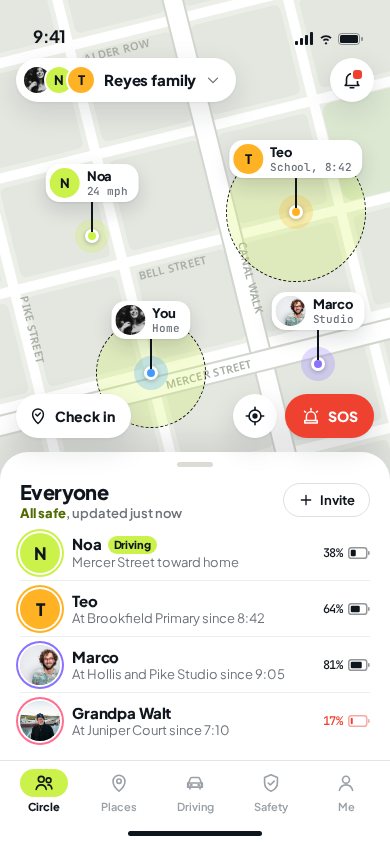
Tether is a complete family location and safety app: welcome, location access, sign in and joining a circle, a live circle map with everyone's place and battery, a member page, a day of location history, places with arrival and departure alerts, adding a place, weekly driving reports and a single drive, live walk home tracking, check in, an SOS with its confirmation, crash detection, emergency contacts, alerts, circle members, invites, a Plus plan with checkout, profile and settings. Paper and white with ink, hi-vis lime and a signal red.
| Detail | Value |
|---|---|
| Screen type | Home |
| App | Tether: Family location and safety |
| Category | Social |
| Design language | Minimal, light |
| Type | Plus Jakarta Sans |
| Colours | #f4f4f0 background, #ffffff surface, #10161d text, #6d727a text-muted, #cbf24a accent, #10161d accent-contrast, #4f6b00 secondary, #e6e6df border, #ef4130 danger |
What this screen says
- TeoSchool, 8:42
- Noa24 mph
- YouHome
- MarcoStudio
- NT
- Reyes family
- Check in
- SOS
- Everyone
- All safe, updated just now
- Invite
- NoaDriving
- Mercer Street toward home
- Teo
- At Brookfield Primary since 8:42
- Marco
- At Hollis and Pike Studio since 9:05
- Grandpa Walt
- At Juniper Court since 7:10
- Circle
- Places
- Driving
- Safety
- Me
Around it in Tether
More home screens
- Onair Home: Live streaming
- Drift Home: Reels and voice rooms
- Glitz Discover: Party live streaming
- Hearth Chats: Messenger for trips and circles
- Chirp Chats: Messenger with file sharing
- Banter Chats: Live messenger
- Natter Chats: Minimal messenger
- Nearly Home: Dating by crossed paths
- Linkup Home: Professional network and jobs
- Quorum Home: Questions and expert answers
- Backer Home: Support creators with memberships
- Pledge Discover: Back creative projects
What makes a good home screen
- Put the most important thing first. Decide the one thing most people come for, like today's workout, a balance or the next booking, and give it the top of the screen.
- Make it feel current. Greetings with the time of day, today's date, fresh numbers and recent activity tell people the app is alive and about them.
- Keep quick actions within thumb reach. The two or three things people do most should be one tap away, in the lower part of the screen or a floating button.
- Group related content in clear sections. Use headings and spacing so the screen scans as a few blocks, not a long mixed list.
The full home screen guide and every example
Remix Tether free: describe your own app and it is drawn in this design. Or get its files from $10: Figma, React Native, SwiftUI, Flutter and HTML.