Templates · Onboarding screens · Productivity app · Tapline
Tapline Claim handle screen
An onboarding screen from Tapline, a link-in-bio pages and analytics app template in a Gen Z style. Screen 2 of 25.
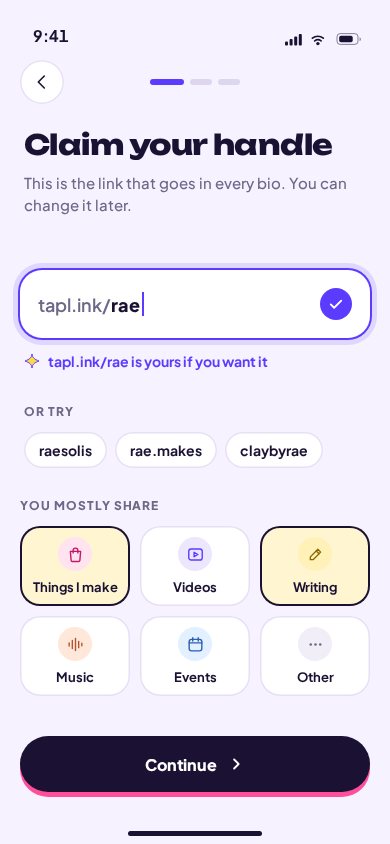
Tapline is a complete link-in-bio app: claim a handle, sign up, a page home with today's numbers, links you drag to reorder, add and edit a link, themes and button styles, social icons, the public page as a visitor sees it, a shop with products, a tip jar with a visitor tip checkout and thank you, subscribers, analytics, audience, live visitors, a QR code, a Pro plan, activity, profile and settings. Lavender milk and white with ink outlines, ultraviolet, bubblegum pink and sun yellow.
| Detail | Value |
|---|---|
| Screen type | Onboarding |
| App | Tapline: Link-in-bio pages and analytics |
| Category | Productivity |
| Design language | Gen Z, light |
| Type | Unbounded for headings, Plus Jakarta Sans for text |
| Colours | #f6f2ff background, #ffffff surface, #1b1233 text, #6e6787 text-muted, #5b3cff accent, #ffffff accent-contrast, #ff4f9a secondary, #ffd84a highlight, #e7e0f5 border, #e5484d danger |
What this screen says
- Claim your handle
- This is the link that goes in every bio. You can change it later.
- tapl.ink/ rae
- tapl.ink/rae is yours if you want it
- Or try
- raesolis rae.makes claybyrae
- You mostly share
- Things I make
- Videos
- Writing
- Music
- Events
- Other
- Continue
Around it in Tapline
More onboarding screens
- Glance Welcome: Visual search with the camera
- Replay Welcome: Record and share screen videos
- Easel Welcome: Collaborative whiteboard
- Token Welcome: Two-factor codes and sign-in approvals
- Beam Welcome: Send big files
- Parchment Welcome: Documents, edit and share
- Lectern Welcome: Slides and presenter remote
- Ringer Welcome: Phone, contacts and voicemail
- Pipeline Welcome: Sales CRM on the road
- Aim Welcome: Goals and key results
- Scribe Welcome: Voice memos to notes
- Inkline Welcome: Sign and send contracts
Every productivity app onboarding screen
What makes a good onboarding screen
- One idea per screen. Each screen should say one thing in a headline people can read in a second. If a screen needs a paragraph, it is doing too much.
- Personalise with a purpose. Ask a question only if the answer changes what people see next, like a goal, a level or an interest. Then show that the answer mattered.
- Explain permissions before asking. Show your own screen saying why you need notifications, location or the camera before the system prompt. People who understand the reason are more likely to allow it.
- Let people skip. A visible skip or "I'll do this later" respects returning users and the impatient. Make sure skipping still lands them somewhere useful.
The full onboarding screen guide and every example
Remix Tapline free: describe your own app and it is drawn in this design. Or get its files from $10: Figma, React Native, SwiftUI, Flutter and HTML.