Templates · Onboarding screens · Productivity app · Parchment
Parchment Welcome screen
An onboarding screen from Parchment, a productivity app template in a Minimal style. Screen 1 of 25.
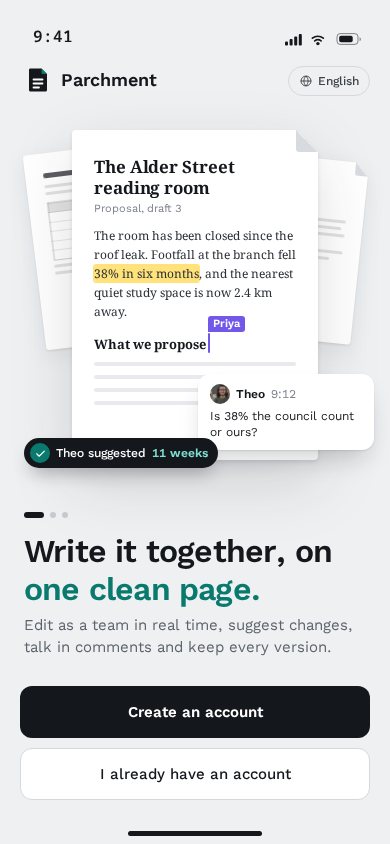
Parchment is a complete documents app: welcome, sign in, a home with new document starters and a grid of recent pages, search, files and shared with me, a document page, live editing with a formatting bar and keyboard, text style, suggestion mode with tracked changes, comments and a reply thread, the outline, share with roles, link access and an invite sent screen, version history and an old version to restore, templates, document activity, offline files, notifications, a Pro plan, profile and settings. Fog grey and paper white with ink, verdigris and a highlighter yellow.
| Detail | Value |
|---|---|
| Screen type | Onboarding |
| App | Parchment: Documents, edit and share |
| Category | Productivity |
| Design language | Minimal, light |
| Type | Iowan Old Style for headings, Work Sans for text |
| Colours | #eef0f2 background, #ffffff surface, #14171c text, #687079 text-muted, #0b7a6e accent, #ffffff accent-contrast, #ffe27a secondary, #e0e3e7 border, #c23b4a danger |
What this screen says
- Parchment
- English
- The Alder Street reading room
- Proposal, draft 3
- The room has been closed since the roof leak. Footfall at the branch fell 38% in six months , and the nearest quiet...
- What we proposePriya
- Theo9:12
- Is 38% the council count or ours?
- Theo suggested 11 weeks
- Write it together, on one clean page.
- Edit as a team in real time, suggest changes, talk in comments and keep every version.
- Create an account
- I already have an account
Around it in Parchment
More onboarding screens
- Tandem Welcome: Team chat, channels and huddles
- Shipyard Welcome: Issue tracking for product teams
- Canvas Welcome: Design files and comments on mobile
- Merge Welcome: Code, pull requests and reviews
- Query Welcome: AI answers with sources
- Glossa Welcome: Translate text, voice and camera
- Layout Welcome: Design anything from templates
- Tick Welcome: To-do lists and reminders
- Beacon Welcome: Find your devices and people
- Staffroom Welcome: HR, payslips and time off
- Slot Welcome: Booking links and meeting scheduling
- Sheet Welcome: Spreadsheets and databases
Every productivity app onboarding screen
What makes a good onboarding screen
- One idea per screen. Each screen should say one thing in a headline people can read in a second. If a screen needs a paragraph, it is doing too much.
- Personalise with a purpose. Ask a question only if the answer changes what people see next, like a goal, a level or an interest. Then show that the answer mattered.
- Explain permissions before asking. Show your own screen saying why you need notifications, location or the camera before the system prompt. People who understand the reason are more likely to allow it.
- Let people skip. A visible skip or "I'll do this later" respects returning users and the impatient. Make sure skipping still lands them somewhere useful.
The full onboarding screen guide and every example
Remix Parchment free: describe your own app and it is drawn in this design. Or get its files from $10: Figma, React Native, SwiftUI, Flutter and HTML.