Templates · Detail screens · Smart home app · Meter
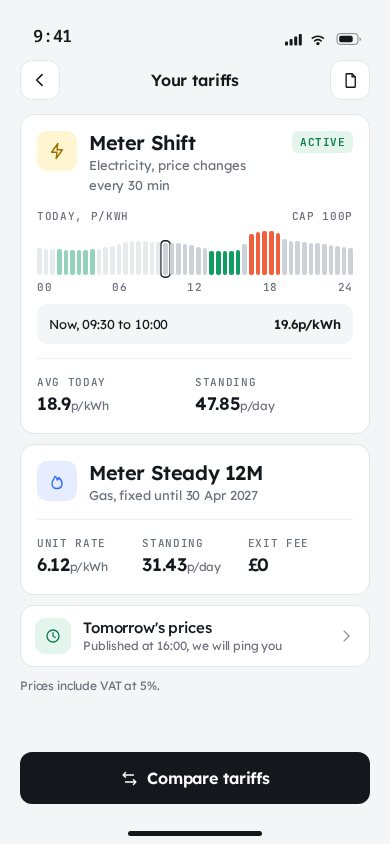
Meter Tariff screen
A detail screen from Meter, a smart home app template in a Clinical style. Screen 11 of 25.
Meter is a complete energy supplier account: welcome and sign in, a home with the account balance, the next cheaper window and today's use, half-hourly smart meter usage, monthly insights, live usage, meter readings with a photo scan, confirm and sent, tariff details with unit rates, compare and switch tariff with review and confirmation, bills and a statement breakdown, balance, direct debit, cheaper time alerts, notifications, fault reporting with a live engineer visit, help, account and settings. Pale grey and white with graphite and signal yellow.
| Detail | Value |
|---|---|
| Screen type | Detail |
| App | Meter: Your energy supplier account |
| Category | Smart home |
| Design language | Clinical, light |
| Type | JetBrains Mono for headings, Lexend for text |
| Colours | #f4f5f7 background, #ffffff surface, #14171c text, #6b717c text-muted, #ffcf24 accent, #14171c accent-contrast, #2f6bff secondary, #e2e5ea border, #e5484d danger |
What this screen says
- Your tariffs
- Meter Shift
- Electricity, price changes every 30 min
- Active
- Today, p/kWh Cap 100p
- Now, 09:30 to 10:00 19.6p/kWh
- Avg today 18.9p/kWh
- Standing 47.85p/day
- Meter Steady 12M
- Gas, fixed until 30 Apr 2027
- Unit rate 6.12p/kWh
- Standing 31.43p/day
- Exit fee £0
- Tomorrow's pricesPublished at 16:00, we will ping you
- Prices include VAT at 5%.
- Compare tariffs
Around it in Meter
More detail screens
- Lobby Door key: Apartment building app
- Sweep Room: Robot vacuum and mop
- Dusk Scenario: Smart home scenarios
- Lumen Living room: Smart home energy
- Abode Room: Smart home devices
- Boxed Room: Book movers and plan moving day
- Couch Title: TV remote, casting and watchlist
- Chime Answer: Voice assistant and smart speaker
- Latch Front door: Smart locks and guest access
- Mesh Node: Home Wi-Fi network
- Decibel Room: Multi-room speakers
- Nursery Clip: Baby monitor camera and sleep
Every smart home app detail screen
What makes a good detail screen
- Lead with what identifies the item. A large image or title, the price or status, and the key facts at the top. People should know they are in the right place at a glance.
- Keep the main action visible. A sticky bottom button for Add to cart, Book or Play stays reachable while people scroll through details.
- Order information by importance. The facts that decide the choice come first; reviews, specifications and fine print further down.
- Use progressive disclosure. Long descriptions, specifications and policies can expand on tap rather than filling the screen.
The full detail screen guide and every example
Remix Meter free: describe your own app and it is drawn in this design. Or get its files from $10: Figma, React Native, SwiftUI, Flutter and HTML.