Templates · Detail screens · Productivity app · Swarm
Swarm Pieces screen
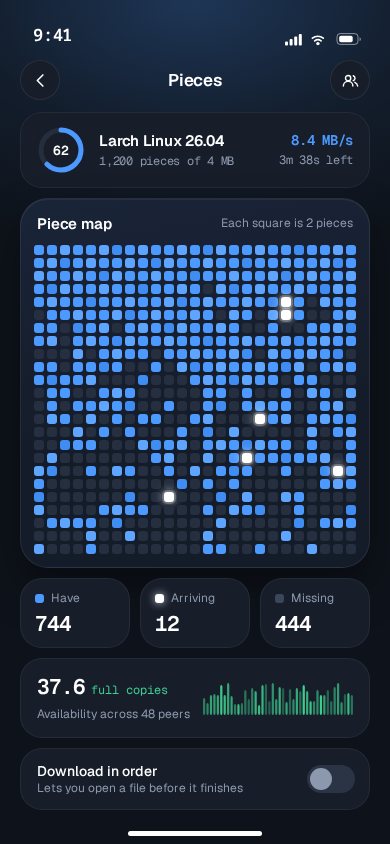
A detail screen from Swarm, a torrent client app template in a Dark-first style. Screen 12 of 25.
Swarm is a complete torrent client for open and public domain files: welcome, storage access, a transfers home with a live speed card, adding a torrent by magnet link, choosing files and a save location, a torrent page with files, peers, trackers and a piece map, speed history, search and results, feeds with auto download rules, a completed library with a player, schedule, speed limits, network, desktop pairing, a Pro plan and settings. Deep slate navy with download blue, seed green and amber.
| Detail | Value |
|---|---|
| Screen type | Detail |
| App | Swarm: Torrent client |
| Category | Productivity |
| Design language | Dark-first, dark |
| Type | Geist |
| Colours | #0e131b background, #171e2a surface, #ffffff text, #8c98ad text-muted, #4c9aff accent, #06101f accent-contrast, #3ecf8e secondary, #242d3c border, #ff6b6b danger |
What this screen says
- Pieces
- Larch Linux 26.041,200 pieces of 4 MB
- 8.4 MB/s3m 38s left
- Piece mapEach square is 2 pieces
- Have
- Arriving
- Missing
- 37.6full copies
- Availability across 48 peers
- Download in orderLets you open a file before it finishes
Around it in Swarm
More detail screens
- Aide Meeting brief: Executive AI assistant
- Juno Chat: AI chat assistant
- Opal Project: Studio dashboard
- Jot Note: Quick notes and checklists
- Chrono City: World clock, timers and stopwatch
- Frontdesk Ticket: Customer support inbox
- Campaign: Email marketing campaigns
- Outpost Previews: Schedule social posts
- Pageview Channel: Website analytics
- Polish Suggestion: Writing assistant and keyboard
- Tapline Link: Link-in-bio pages and analytics
- Quill Doc: Docs, wikis and databases in one workspace
Every productivity app detail screen
What makes a good detail screen
- Lead with what identifies the item. A large image or title, the price or status, and the key facts at the top. People should know they are in the right place at a glance.
- Keep the main action visible. A sticky bottom button for Add to cart, Book or Play stays reachable while people scroll through details.
- Order information by importance. The facts that decide the choice come first; reviews, specifications and fine print further down.
- Use progressive disclosure. Long descriptions, specifications and policies can expand on tap rather than filling the screen.
The full detail screen guide and every example
Remix Swarm free: describe your own app and it is drawn in this design. Or get its files from $10: Figma, React Native, SwiftUI, Flutter and HTML.