Templates · Detail screens · Productivity app · Tapline
Tapline Link screen
A detail screen from Tapline, a link-in-bio pages and analytics app template in a Gen Z style. Screen 7 of 25.
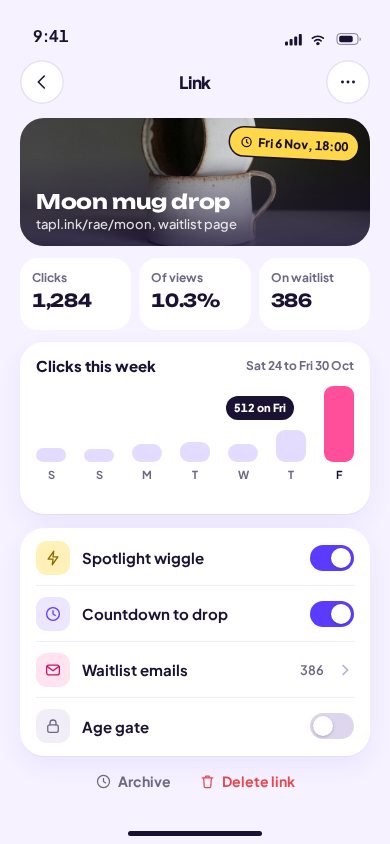
Tapline is a complete link-in-bio app: claim a handle, sign up, a page home with today's numbers, links you drag to reorder, add and edit a link, themes and button styles, social icons, the public page as a visitor sees it, a shop with products, a tip jar with a visitor tip checkout and thank you, subscribers, analytics, audience, live visitors, a QR code, a Pro plan, activity, profile and settings. Lavender milk and white with ink outlines, ultraviolet, bubblegum pink and sun yellow.
| Detail | Value |
|---|---|
| Screen type | Detail |
| App | Tapline: Link-in-bio pages and analytics |
| Category | Productivity |
| Design language | Gen Z, light |
| Type | Unbounded for headings, Plus Jakarta Sans for text |
| Colours | #f6f2ff background, #ffffff surface, #1b1233 text, #6e6787 text-muted, #5b3cff accent, #ffffff accent-contrast, #ff4f9a secondary, #ffd84a highlight, #e7e0f5 border, #e5484d danger |
What this screen says
- Link
- Fri 6 Nov, 18:00
- Moon mug drop
- tapl.ink/rae/moon, waitlist page
- Clicks
- Of views
- On waitlist
- Clicks this week
- Sat 24 to Fri 30 Oct
- 512 on Fri
- Spotlight wiggle
- Countdown to drop
- Waitlist emails 386
- Age gate
- Archive Delete link
Around it in Tapline
More detail screens
- Slot Meeting: Booking links and meeting scheduling
- Sheet Record: Spreadsheets and databases
- Tunnel Country: VPN and online privacy
- Ping Test details: Internet speed test
- Glance Product: Visual search with the camera
- Replay Video: Record and share screen videos
- Easel Retro template: Collaborative whiteboard
- Token Account: Two-factor codes and sign-in approvals
- Beam Transfer: Send big files
- Parchment Document: Documents, edit and share
- Lectern Deck: Slides and presenter remote
- Ringer Call details: Phone, contacts and voicemail
Every productivity app detail screen
What makes a good detail screen
- Lead with what identifies the item. A large image or title, the price or status, and the key facts at the top. People should know they are in the right place at a glance.
- Keep the main action visible. A sticky bottom button for Add to cart, Book or Play stays reachable while people scroll through details.
- Order information by importance. The facts that decide the choice come first; reviews, specifications and fine print further down.
- Use progressive disclosure. Long descriptions, specifications and policies can expand on tap rather than filling the screen.
The full detail screen guide and every example
Remix Tapline free: describe your own app and it is drawn in this design. Or get its files from $10: Figma, React Native, SwiftUI, Flutter and HTML.